Panel builders and system integrators face a complex decision matrix: dozens of vendors, multiple form factors, competing software ecosystems, and conflicting technical specifications. The right HMI drives uptime, operator efficiency, and long-term ROI. The wrong one creates integration headaches, security vulnerabilities, and hardware that fails within months of installation.
This guide breaks down what HMIs are, how they function in control panels, and the six most critical selection factors for industrial environments in 2025.
Key Takeaways
- An HMI is the operator-facing display and control layer connecting humans to PLCs, drives, and sensors in industrial panels
- Six factors drive HMI selection: environmental rating, display performance, PLC compatibility, processing power, software ecosystem, and connectivity/security
- Spec to your actual environment, not just feature lists — mismatches cause early failure and higher lifecycle costs
- Always verify certifications (UL, CE, NEMA, IP rating) before specifying an HMI for harsh or regulated environments
- ValuAdd supplies industrial HMI displays rated IP68 and NEMA 4X/12 — built for washdown, outdoor, and high-dust panel installations
What Is an HMI in Industrial Control Panels?
An HMI (Human-Machine Interface) is a hardware and software interface that allows operators to monitor, control, and visualize the status of machines, processes, or entire systems through a control panel.
The HMI sits between the human operator and the automation layer. It communicates with PLCs, VFDs, and sensors to display real-time data, accept operator commands, trigger alarms, and log events. It is, at its simplest, the layer that turns raw machine signals into information operators can actually use.
Core Functions of an Industrial HMI
Industrial HMIs handle three core functions in any control panel application:
- Real-time data visualization — Converts PLC and sensor signals into dashboards, trend graphs, and status indicators. Operators adjust setpoints or respond to process changes without interpreting raw register values.
- Alarm and event management — Detects out-of-range conditions and triggers on-screen alerts, email notifications, or audible warnings. Alarm system design should follow the ISA-18.2 standard to prevent operator overload and support effective response.
- Data logging and recipe management — Stores production data for historical analysis and compliance. Pre-configured parameter sets (recipes) ensure repeatable process outcomes. In regulated industries, this must meet FDA 21 CFR Part 11 requirements for electronic records and signatures.
Types of Industrial HMIs
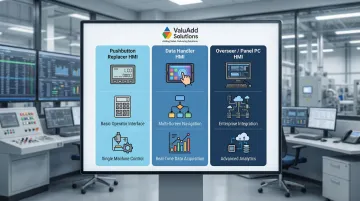
Industrial HMIs fall into three functional tiers:
Pushbutton replacer HMIs are compact, low-cost units that replace physical push buttons and indicator lights. These simple text or graphic displays with physical keypads are ideal for single-machine control where I/O count is low and complex visualization is unnecessary.
Data handler HMIs represent the standard for most control panels. These mid-range units feature touchscreens for visualization, communication, and control. Operators can navigate multiple screens and manage various devices, backed by onboard memory and processing built for continuous data acquisition.
Overseer/Panel PC HMIs are full-featured industrial panel PCs running Windows or Linux. These high-performance units can run SCADA software, manage multiple systems, and integrate with MES/ERP platforms. They're suited for complex, plant-wide control rooms where edge computing and advanced data handling are required.
Key Factors to Consider When Choosing the Right HMI for Industrial Control Panels
HMI selection is not one-size-fits-all. Application environment, communication requirements, operator skill level, and integration complexity each shape which specifications matter most. The six factors below help engineers and procurement teams connect HMI technical specs to measurable operational outcomes like uptime, safety compliance, and total cost of ownership.
Environmental Rating and Protection
Environmental protection is often the first filter in HMI selection. An HMI that cannot survive its installation environment will fail regardless of its other capabilities. Temperature extremes, moisture, dust, vibration, and chemical exposure must all be evaluated before considering any other specification.
IP ratings define enclosure sealing effectiveness according to IEC 60529:
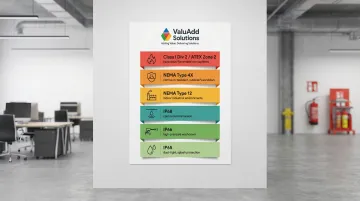
- IP65: Dust-tight with water jet resistance. Adequate for most dry industrial environments with dust and splash exposure
- IP66: High-pressure water jet protection. Required for high-pressure washdowns in food and beverage applications
- IP68: Continuous immersion protection. Needed when submersion risk exists or extreme moisture conditions are present
NEMA ratings are often preferred in North America because they include testing for environmental factors beyond ingress, such as corrosion and icing:
- NEMA Type 12: Protects against falling dirt, circulating dust, lint, fibers, and dripping non-corrosive liquids—the standard for indoor industrial environments
- NEMA Type 4X: Provides protection against windblown dust, rain, splashing water, and hose-directed water. Crucially, Type 4X requires corrosion resistance, making it essential for washdown or outdoor applications
For hazardous locations with flammable gases or vapors, standard IP/NEMA ratings are insufficient. Class I Division 2 (NEC Article 500) is required for locations where flammable gases/vapors are handled in closed systems but could escape under abnormal conditions. ATEX Zone 2 (Directive 2014/34/EU) is the European equivalent.
Mis-specifying environmental ratings causes predictable failures: liquids conduct electricity into PCBs, fine dust degrades internal components, and corrosive exposure turns intermittent faults into complete shutdowns.
ValuAdd's industrial HMI displays are available with IP65, IP66, and IP68 ratings, and NEMA Type 4X and 12 compliance—making them suitable for washdown, outdoor, and harsh process environments.
Display Size, Brightness, and Touch Technology
Display specifications directly affect operator efficiency and error rates. Screen size should match the complexity and viewing distance of the application: small screens for single-machine interfaces, larger displays for control room overviews. Resolution and aspect ratio determine how much data can be shown clearly. The industry has shifted decisively toward 16:9 widescreen formats across sizes ranging from 4" to 22".
Brightness requirements are measured in nits (candelas per square meter):
- Indoor standard: 300–500 nits is adequate for factory floors
- Sunlight-readable: Outdoor applications require at least 1,000 nits for direct sunlight visibility. Standard displays (400–700 nits) are insufficient for high-glare environments
Touch technology involves trade-offs between durability, clarity, and glove compatibility:
| Feature | Resistive Touch | Projected Capacitive (PCAP) |
|---|---|---|
| Activation | Pressure-based (any object) | Conductive touch (finger/special stylus) |
| Glove Use | Excellent (works with thick gloves) | Limited (requires thin gloves or tuning) |
| Optical Clarity | Lower (multiple flexible layers) | Superior (high clarity) |
| Durability | Susceptible to surface wear | Durable glass surface |
| Multi-touch | No | Yes (gestures supported) |
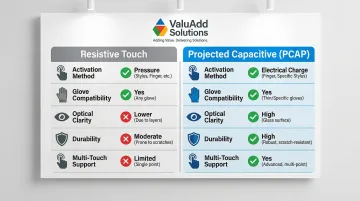
Resistive screens remain the default choice wherever operators wear heavy protective gloves. PCAP is worth the trade-off when UI responsiveness and multi-touch interaction are priorities and glove compatibility has been confirmed.
PLC Compatibility and Communication Protocol Support
An HMI with no native driver for your plant's existing PLC brand forces costly workarounds or replacement of working hardware. Always verify driver libraries before purchasing and confirm support for the specific PLC model, not just the brand family.
Key industrial protocols the HMI should support:
- Modbus RTU/TCP: The universal baseline. RTU (serial) is used for simple, low-cost devices; TCP (Ethernet) is used for larger networks
- EtherNet/IP: Dominant in North America, particularly for Allen-Bradley ecosystems. The installed base of EtherNet/IP devices continues to grow rapidly
- PROFINET: The leading standard in Europe, offering high-speed, real-time communication. The installed base of PROFINET devices surpassed 40 million globally in 2020
- OPC UA: Platform-independent and secure by design, OPC UA is the foundational technology for Industry 4.0. It's essential for connecting HMIs to MES, ERP, and cloud systems
Protocol mismatches routinely delay integrations. Modern systems often need gateway devices to translate between legacy proprietary buses and current protocols like OPC UA or MQTT—each gateway adding cost, complexity, and a new point of failure. Broader native driver libraries reduce this risk as your system evolves.
Processing Power and Data Handling Capability
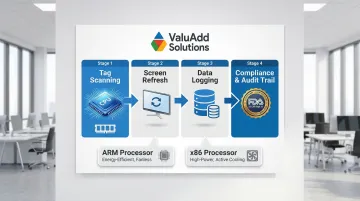
CPU speed and RAM directly determine how many tags the HMI can scan simultaneously, how quickly the screen refreshes, and whether it can run additional software—SCADA clients, data loggers—without lag. The right processor type depends on your application's demands:
- ARM-based processors: Energy-efficient with low heat output. Ideal for fanless, sealed HMIs and low-power IoT gateways handling straightforward monitoring tasks
- x86 processors (Intel/AMD): High raw computational power with broad Windows software compatibility. Required for defect inspection, image processing, or multi-machine oversight—but typically need active cooling due to higher thermal output
Storage and data logging needs must be specified before selecting a unit. HMIs used for regulatory compliance or quality traceability must have sufficient onboard storage and support for external drives or SQL database connectivity. Data logging frequency and alarm history depth should be determined based on regulatory requirements.
For regulated industries, HMIs must support audit trails and secure user authentication. FDA 21 CFR Part 11 mandates strict controls for electronic records and signatures. Systems like Siemens WinCC Unified typically cap logging tags at 5,000 before requiring database solutions.
Software Ecosystem and Programming Environment
The HMI's programming software determines how quickly projects can be built and maintained. A mismatch between the developer's skill level and the software's complexity leads to delayed deployments and difficult long-term support. Look for an intuitive tag-based programming environment with a strong library of pre-built screen objects.
Operating system considerations:
- Windows-based HMIs offer the widest software ecosystem and easiest SCADA integration (Ignition, FactoryTalk, Wonderware). Platforms like Rockwell FactoryTalk View SE and AVEVA System Platform explicitly support Windows 10/11 and Windows Server editions—compatibility with the broadest range of industrial software, at the cost of higher licensing and maintenance overhead
- Embedded Linux/Android units offer lower cost and faster boot times for fixed-function applications. Ignition supports Linux (Ubuntu) and is platform-agnostic, giving integrators flexibility for lightweight, customized deployments
Total Cost of Ownership (TCO) must account for software licensing and maintenance. Vendors typically use tiered licensing based on tag counts or client sessions. Rockwell Automation's lifecycle statuses (Preferred, Managed, Limited, Retired) illustrate a recurring cost reality: ongoing updates for OS compatibility and security patches are not optional. Budget for them from the start.
ANSI/ISA-101.01-2015 provides a practical framework for HMI design, covering usability, display structure, and intuitive interaction—worth referencing when defining screen layout standards for your application.
Connectivity, Remote Access, and Cybersecurity
In 2025, industrial HMIs are increasingly connected to plant networks, cloud platforms, and remote monitoring systems. Connectivity specifications and security features are as important as hardware specs.
Connectivity requirements:
- Confirm the HMI supports Ethernet, Wi-Fi, and ideally cellular options for distributed installations
- Dual Ethernet ports provide network redundancy and load balancing—critical for high-availability applications
- Multiple serial ports (RS-422/485, RS-232C) enable integration with legacy equipment
Cybersecurity is now a specification mandate, not an afterthought. In late 2023/early 2024, cyber actors actively manipulated HMIs and PLCs in US water/wastewater systems, exploiting public-facing IPs and default credentials. Ransomware attacks on industrial organizations increased by 87% in 2024, with 75% of incidents leading to partial OT shutdowns.
Look for HMIs with:
- TPM (Trusted Platform Module) 2.0 support for secure hardware-based encryption
- Role-based user access controls to limit operator permissions
- Encrypted communications and VPN compatibility for secure remote access
- Secure boot and kernel locking to prevent unauthorized firmware modifications
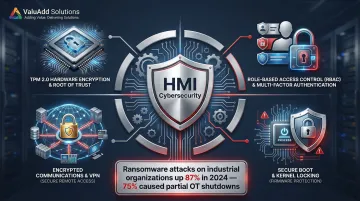
For water treatment, oil and gas, and other critical infrastructure applications, compliance frameworks may mandate these features. CISA & NIST SP 800-82 emphasize the need to inventory assets, enforce MFA for remote access, and eliminate direct connections to control networks. ISA/IEC 62443 is the global standard for IACS security, covering policies, system design (zones and conduits), and component requirements.
Evaluate vendor support for firmware updates and patch management over the product lifecycle. Modern VPNs with strong authentication are recommended for all remote connections.
How ValuAdd Can Help You Choose the Right HMI
Selecting the right HMI means balancing environmental specs, connectivity requirements, certifications, and project timelines — often simultaneously. ValuAdd's industrial HMI portfolio addresses each of these directly, with displays built for harsh panel environments and pre-certified to common regulatory standards.
ValuAdd's HMI display solutions carry UL, CE, and FCC certifications alongside IP65, IP66, and IP68 ingress protection and NEMA Type 4X and 12 compliance, so panel builders don't need additional third-party testing to satisfy regulatory requirements.
Key advantages for HMI selection and procurement:
- High-brightness displays rated IP68 for washdown, outdoor, and wet-area installations
- NEMA Type 4X and 12 enclosures for direct integration into industrial control panels
- UL Listed, CE, and FCC Certified products that arrive ready for regulated environments
- Territory-based technical support for application-specific configuration and compatibility checks
- Fast shipping options to keep commissioning schedules on track
ValuAdd's technical team works with engineers during the selection process — reviewing environmental ratings, connectivity requirements, and compatibility with existing control systems before purchase.
Conclusion
HMI selection should begin with environment and integration requirements—not brand familiarity or price alone. The right specification process protects your investment and reduces the risk of premature failure or costly redesigns.
An oversized or undersized HMI wastes budget or creates bottlenecks. The six-factor framework in this guide provides the structure to match capabilities to actual operational demands:
- Environmental protection — IP/NEMA rating for the deployment conditions
- Display performance — brightness, touch response, and viewing angle for the workspace
- PLC compatibility — native protocol support without gateway workarounds
- Processing power — CPU and memory headroom for future application growth
- Software ecosystem — IDE usability, licensing model, and remote access tools
- Connectivity and security — network architecture, authentication, and firmware update cadence
Remote access, IIoT connectivity, and cybersecurity requirements will only deepen in the years ahead. Treat HMI selection as part of a longer-term control architecture strategy and revisit specifications as production needs change.
Industrial HMIs from reputable manufacturers typically offer 7–10+ year product lifecycles, with some vendors like Siemens offering up to 22 years of product support. Confirm vendor end-of-life and firmware support commitments before purchasing.
Frequently Asked Questions
What is the difference between an HMI and a SCADA system?
An HMI is a local operator interface for a specific machine or panel, while SCADA is a supervisory system that aggregates data from multiple HMIs and PLCs across a facility or site. HMIs are often components within a broader SCADA architecture, serving as visualization points for individual processes.
What IP rating do I need for my industrial HMI?
IP65 is adequate for most dry industrial environments with dust and splash exposure. IP66 is required for high-pressure washdowns in food and beverage applications. IP68 is needed when submersion risk exists. Hazardous locations also require Class I Div 2 or ATEX certification.
Can an HMI replace a PLC in a control panel?
While some HMI+PLC combo units exist for simple applications, a standalone HMI is not a PLC replacement. HMIs visualize and accept commands but rely on the PLC to execute control logic and manage I/O. The two devices serve distinct and complementary roles in the control architecture.
What is the difference between a standalone HMI and an industrial panel PC?
Standalone HMIs run proprietary embedded software purpose-built for visualization and PLC communication. Industrial panel PCs run standard operating systems (Windows, Linux) and can host SCADA software, databases, and custom applications. This offers more flexibility but adds complexity and cost.
How long do industrial HMIs typically last in service?
Most industrial HMIs from reputable manufacturers offer 7–10+ year product lifecycles, though actual service life depends on correct environmental rating selection. Siemens specifies a 50,000-hour Half Brightness Life Time (MTBF) for standard models. Confirm end-of-life and firmware support commitments with your vendor before purchasing.
What communication protocols should an HMI support for modern industrial applications?
Modbus RTU/TCP is a universal baseline. EtherNet/IP is essential for Allen-Bradley PLCs, PROFINET for Siemens, and OPC UA for IIoT and SCADA integration. Confirm that the HMI has a native driver for the specific PLC model in your application, not just generic protocol support.