Introduction
Picture this: A pharmaceutical plant's $500,000-per-hour production line grinds to a halt because an operator's contaminated glove triggered false inputs on a standard capacitive touchscreen. Or a water treatment facility's keypad interface fails after months of high-pressure chemical washdowns, leaving operators unable to adjust critical process parameters. These aren't hypothetical scenarios—they're real-world consequences of poor HMI interface selection that contribute to the estimated $1 trillion in annual unplanned downtime costs across process industries globally.
In oil refineries, water treatment plants, and heavy manufacturing floors, choosing between touchscreen and keypad HMI interfaces is a critical engineering decision that directly impacts operator safety, equipment uptime, and long-term maintenance costs. According to ABB's 2025 industry study, 83% of decision-makers report that unplanned downtime costs at least $10,000 per hour, with 44% experiencing equipment-related interruptions monthly.
When HMI failures are the root cause, the impact hits production, safety, and budget simultaneously.
That survival comes down to the conditions the interface must handle daily:
- Heavy gloves that block capacitive signals
- Water droplets that create phantom touches
- Airborne dust that fouls mechanical switches
- Temperature extremes that degrade digitizers and LCD backlights
Key Takeaways
- Industrial HMIs connect operators to machine controls — and interface type determines usability under harsh conditions
- Touchscreens offer flexible UI and data visualization but fail under gloves, liquid exposure, and direct sunlight
- Keypads deliver tactile reliability in wet, dirty, high-vibration environments where precision input matters most
- Key selection factors: IP/NEMA ratings, operator PPE requirements, cleaning protocols, and compliance certifications
- This guide maps both interfaces against real application conditions to help you choose the right fit
What Is an Industrial HMI?
An industrial Human-Machine Interface (HMI) is the hardware and software that enables human interaction with machines and processes in real-time. Unlike consumer touchscreens, these interfaces are engineered to withstand rigorous operating conditions while providing continuous control, visualization, and data monitoring for industrial automation systems.
Types of Industrial HMI Interfaces
Industrial HMIs are available in three primary form factors:
- Panel-Mounted HMIs: Terminals that mount into control cabinet cutouts for flush-fit integration in manufacturing control panels and machine automation
- Embedded HMIs: Compact units built directly into machinery or handheld diagnostic tools
- Industrial Panel PCs: Single-chassis systems combining display and computing power for SCADA applications and edge data processing
Within these form factors, touchscreen and keypad interfaces represent the two dominant input methods. The global HMI market reflects this evolution—valued at $5.82 billion in 2026 and projected to reach $8.29 billion by 2031, with touchscreens commanding 70.4% of market share in 2025.
Modern HMIs go far beyond simple data display. They support alarm management, process visualization, data logging, and connectivity to PLCs, SCADA systems, and IIoT networks. That functional depth is exactly why the touchscreen vs. keypad decision matters: the interface you choose shapes how operators interact with every layer of your control architecture, from routine monitoring to fault response.
Touchscreen vs. Keypad Interfaces: Understanding the Core Difference
Both interface types appear across industrial applications, but their performance diverges sharply once environmental stressors enter the equation. Chemical exposure, vibration, humidity, and operator PPE requirements separate reliable interfaces from liability risks.
Touchscreen HMI: Strengths and Limitations in Harsh Environments
Strengths:
- Intuitive multi-function UI that reduces training time and operator error
- Dynamic graphics and data-rich dashboards for complex process visualization
- Software-driven flexibility allowing workflow updates without hardware changes
- Smooth surfaces that simplify decontamination in hygienic applications
Industrial touchscreens excel when operators need to navigate complex menus, view real-time trends, or interact with multiple process parameters through a single interface. The ability to reconfigure screens through software alone delivers long-term operational flexibility that fixed keypads cannot match.
Limitations in Harsh Environments:
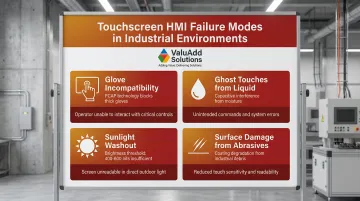
Touchscreens face real challenges under industrial conditions. Four failure modes account for most field problems:
- Glove incompatibility: Standard capacitive screens reject input from thick work gloves. Research shows glove thickness is the most critical PCAP performance factor — medical gloves under 5mm typically work, but heavy-duty gloves can block capacitive signals entirely.
- Ghost touches from liquid: Conductive fluids (water, cutting oil, coolant) bridge capacitive sensors and trigger false inputs that disrupt operations.
- Washout in high-ambient-light: Standard displays become unreadable in direct sunlight or bright shop floors without high-brightness backlights (1,000+ cd/m²).
- Surface damage from abrasives: Repeated contact with grit or metal particulate scratches display glass, degrading both readability and touch sensitivity over time.
Mitigation Strategies:
Industrial-grade PCAP touchscreens address most of these issues when specified correctly:
- Optical bonding fills the air gap between touch sensor and display glass with transparent resin, eliminating reflections and boosting contrast without added power draw
- IP66/IP68 sealing blocks water and particulate ingress at the bezel and sensor layer
- "Glove mode" firmware increases sensitivity thresholds to detect input through thick PPE
- Resistive touchscreens (pressure-based rather than capacitive) offer universal glove compatibility where gloves are mandatory and UI complexity is low
Keypad HMI: Strengths and Limitations in Harsh Environments
Strengths:
- Tactile confirmation critical when gloves are worn or visibility is limited
- No false activation from liquid splashes or airborne contaminants
- Proven reliability under high-vibration and extreme-temperature conditions
- Mechanical longevity with actuation ratings of 5–10 million cycles (some switches rated to 50 million)
For safety-critical inputs, physical feedback is non-negotiable. A button press confirms the action regardless of screen state, glove type, or ambient light — which is exactly why emergency stops and process shutdowns rely on mechanical switches, not touch targets. In a 24/7 manufacturing environment running 100 presses per shift, a 5-million-cycle keypad could last over 45 years.
Limitations:
- Fixed-function constraints: Changing the interface requires physical button replacement, not a software update — a real cost in rapidly evolving processes
- Debris ingress in open-gap designs: Standard keypads accumulate grit and oil in key gaps; sealed membrane keypads eliminate this through continuous surface construction rated IP65 to IP68
- Limited data visualization: Keypads cannot display real-time trends or multi-parameter dashboards, which limits their use in data-intensive monitoring applications
Sealed membrane keypads are particularly well-suited to food processing and pharmaceutical environments where daily washdown and chemical sanitizing demand surfaces with no gaps, ports, or crevices.
Hybrid HMI Interfaces: When You Need Both
Hybrid HMIs combine a touchscreen display with dedicated physical function keys or emergency stop buttons mounted alongside it. The result: UI flexibility for process navigation paired with physical confirmation for safety-critical actions — no software state can disable a hardwired stop button.
Typical hybrid applications include machine control panels where operators need touchscreen access to process parameters but require physical emergency stops that work regardless of software state, and mobile equipment interfaces where vibration might compromise touchscreen accuracy but physical controls remain functional.
Key Factors to Consider When Selecting an Industrial HMI Interface
Selecting between touchscreen and keypad is rarely binary. It requires mapping technical specifications to real operating conditions, regulatory obligations, and long-term operational economics.
Environmental Protection Rating (IP and NEMA)
IP (Ingress Protection) ratings and NEMA classifications measure an HMI's ability to withstand dust, water, and chemical exposure.
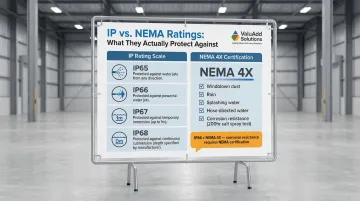
IP Rating Definitions:
- IP65: Dust-tight + protection against low-pressure water jets from any direction
- IP66: Dust-tight + protection against powerful water jets
- IP67: Dust-tight + temporary immersion up to 1 meter for 30 minutes
- IP68: Dust-tight + continuous immersion beyond 1 meter (manufacturer-defined depth)
NEMA Type 4X provides protection against windblown dust, rain, splashing water, and hose-directed water, but uniquely adds corrosion resistance requirements including 200 hours of salt spray exposure testing. This makes it superior to IP ratings alone for coastal or chemical applications.
Critical Distinction:
IP and NEMA ratings are not interchangeable. An IP66 enclosure protects against water jets but doesn't guarantee protection against corrosion or ice formation that NEMA 4X does. One manufacturer substituted an IP66 unit for a required NEMA 4X specification and experienced corrosion failure within 18 months — costing over $50,000 in replacements and downtime.
For washdown areas in food processing or pharmaceuticals, specify IP66 minimum, with IP68 recommended for submersion-risk environments. Touchscreens with flat, chemically strengthened glass surfaces allow seamless sealing and easier cleaning than keypads with crevices, though keypad overlays can degrade if not rated for specific chemical exposure.
Operator Conditions and PPE Requirements
If operators routinely wear heavy-duty gloves, work with wet or oily hands, or operate in low-visibility environments, interface selection becomes critical.
Glove Compatibility:
Resistive touchscreens work with any glove type because they rely on pressure. PCAP touchscreens require specific tuning for gloved operation—most work with thin medical gloves under 5mm but struggle with thick industrial gloves. Without proper "glove mode" configuration, operator error rates can increase by nearly 24% for small touch targets.
Industrial PCAP screens from manufacturers like Elo are explicitly designed to work with latex and thin work gloves without minimum touch force requirements. For thick insulating gloves, however, resistive touchscreens or specialized PCAP with hardware enhancements — high-performance controllers, enlarged electrodes — are the reliable choice.
Real-World Validation:
Customer feedback confirms these differences. One maintenance supervisor at a steel works noted: "Our operators wear heavy gloves, but this resistive touchscreen works perfectly every time." This tactile reliability directly impacts operator error rates and cycle time—factors that compound into significant productivity differences over thousands of daily interactions.
Environmental Extremes: Temperature, Vibration, and Shock
Temperature Ranges:
Standard industrial HMIs typically operate from 0°C to 50°C, but extreme environments demand specialized specifications. High-end models like Siemens Comfort Panels Outdoor extend this to -30°C to +60°C, while Rockwell Automation's 6181X Series H operates from -20°C to +70°C.
Operating outside rated ranges causes LCD blackouts (isotropic phase — where LCD crystals lose alignment and the screen goes dark), backlight dimming, or permanent housing damage. For cold storage facilities (typically -18°C to -23°C) or high-heat applications like foundries, verify temperature specifications before deployment.
Vibration and Shock Tolerance:
High-vibration applications—mining equipment, marine installations, heavy machinery—favor sealed keypad designs with no fragile touch-layer components. Constant vibration can loosen connections in touchscreen digitizers, leading to intermittent failures.
Leading manufacturers publish specific tolerance ratings for these conditions. Rockwell Automation, for example, certifies shock tolerance of 15g (11ms) and vibration tolerance of 2g peak (57-640 Hz). Sealed membrane keypads generally offer higher inherent vibration resistance due to solid-state construction compared to the delicate connectors of touchscreens.
Maintenance, Cleaning, and Serviceability
Environments with frequent washdowns or chemical cleaning require HMI surfaces that tolerate repeated high-pressure or chemical cleaning without degrading the interface layer.
Cleaning Considerations:
Smooth touchscreen surfaces are easier to decontaminate than keypad gaps. Industrial-grade glass resists standard cleaning solutions, but repeated high-pressure washdowns can compromise seals if the unit isn't rated IP69K or NEMA 4X.
One food processing plant that deployed IP65 HMIs where NEMA 4X was required suffered water ingress during washdown, leading to two days of lost production.
MTBF and Lifecycle Data:
Key reliability benchmarks to compare when evaluating interface options:
- Industrial workstation MTBF: 50,000–500,000 hours (varies by manufacturer and environment)
- Keypad switch actuation cycles: 5–10 million standard; up to 50 million for high-end mechanical switches
- Touchscreen digitizer lifespan: Subject to degradation from UV exposure, scratching, and thermal cycling
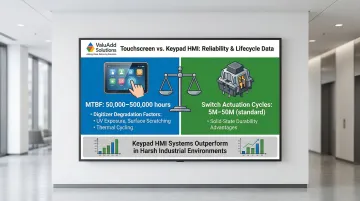
In harsh environments, keypad switches typically outlast touchscreen digitizers — a relevant factor when calculating total lifecycle cost.
Connectivity, Protocol Support, and Integration
Regardless of interface type, the HMI must support the communication protocols used in your existing control architecture — without protocol compatibility, integration with PLCs and SCADA systems simply won't work.
Standard Protocols:
Modern industrial touchscreen HMIs universally support Modbus RTU/TCP, EtherNet/IP, PROFINET, OPC UA, and MQTT. This protocol coverage enables direct integration into Industry 4.0 and IIoT architectures.
IIoT Readiness:
Panel PCs and touchscreen HMIs generally offer broader native IIoT connectivity than keypad-only units. Protocols like OPC UA enable secure, vendor-agnostic data exchange, while MQTT is the standard for lightweight messaging to cloud platforms like AWS or Azure.
Keypad HMIs frequently lack native IIoT protocols, but they can still participate in Industry 4.0 networks through a connected PLC or gateway that handles upstream data transmission. The determining factor is the HMI's onboard protocol support — not the input type itself.
Certifications and Regulatory Compliance
Industry-specific certifications are mandatory, not optional. Deploying non-certified equipment in regulated environments can trigger production halts, regulatory fines, and mandatory replacement — costs that far exceed the price difference between certified and non-certified units.
Baseline Certifications:
- UL Listed: Ensures the device meets US safety standards for shock and fire hazards
- CE: Indicates compliance with EU health, safety, and environmental protection standards
- FCC: Ensures the device doesn't emit harmful electromagnetic interference
Hazardous Location Requirements:
For explosive atmospheres, specific certifications are mandatory:
- ATEX (EU) and IECEx (Global) certify equipment for explosive atmospheres
- Class I Division 2 (NEC Article 500) and Zone 2 (NEC Article 505) ratings are required in North America for areas where flammable gases may be present
- NEMA 4X is essential for corrosive environments
Both touchscreen and keypad HMIs must carry the same compliance certifications for the target environment. Verify certification requirements during the specification phase — not after installation.
How ValuAdd Can Help You Choose the Right Industrial HMI
ValuAdd supplies industrial control and automation components for engineers and plant managers working in demanding environments. Their HMI portfolio carries certifications including UL Listed, CE, FCC, IP65, IP66, IP68, and NEMA Type 4X and 12 compliance.
Product Portfolio:
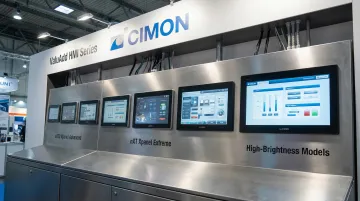
ValuAdd's CIMON HMI lineup spans multiple form factors and protection levels:
- eXT2 Xpanel Advanced Series: 7-inch to 15.6-inch displays with IP68 protection, dual Ethernet connectivity, and aluminum construction
- nXT Xpanel Extreme Series: Premium models with capacitive multi-touch, extended temperature range (-20°C to +65°C), and Class 1 Div 2 hazardous location ratings
- High-Brightness Models: 1,200 cd/m² output for outdoor installations and environments with intense ambient light
Competitive Advantages:
ValuAdd's team works directly with engineers and system integrators across industrial manufacturing, water treatment, oil and gas, and processing facilities. Key differentiators include:
- Specialists who match HMI specs to actual operating conditions — PPE requirements, cleaning protocols, hazardous area classifications
- Custom engineering guidance for non-standard application requirements
- Resistive and capacitive touch options across multiple display sizes and IP ratings
- 48-hour delivery available for urgent production line orders
Application-Specific Guidance:
ValuAdd's technical specialists go beyond matching IP ratings — they help you identify which interface type delivers the lowest total cost of ownership for your specific conditions, from operator glove requirements to washdown frequency to control system integration.
Whether you're upgrading water treatment control panels, specifying HMIs for food processing washdown areas, or selecting interfaces for Class 1 Div 2 oil and gas locations, ValuAdd's team provides consultation backed by direct product knowledge and cross-industry application experience.
Conclusion
Choosing between touchscreen and keypad HMIs comes down to a systematic evaluation of your specific conditions: environment severity, operator PPE requirements, maintenance protocols, compliance obligations, and integration needs.
Each interface type has a clear performance envelope:
- Touchscreens excel where flexible UI, complex data visualization, and software-driven adaptability are priorities—provided you specify industrial-grade units with appropriate IP ratings, glove compatibility, and optical bonding.
- Keypads deliver proven tactile reliability and mechanical longevity in wet, dirty, or high-vibration environments where deliberate, error-free input matters more than display flexibility.
HMI selection is a long-term capital decision—one worth revisiting as operational conditions change. Specifying the correct IP-rated, certified interface upfront will always cost less than emergency replacement after a field failure. With unplanned downtime running up to $500,000 per hour at some facilities, interface reliability is not a place to cut corners.
Frequently Asked Questions
Frequently Asked Questions
Can industrial touchscreens work reliably when operators are wearing gloves?
Yes, but the technology matters. Capacitive touchscreens require glove-compatible PCAP technology with "glove mode" firmware, and performance varies with glove thickness and material. Resistive touchscreens respond to any pressure, making them universally compatible. Manufacturers publish glove compatibility specs—verify these before deployment.
What IP rating is required for HMIs in washdown or wet environments?
IP65 protects against water jets, IP66 against powerful jets, and IP67/IP68 against immersion. For food processing or chemical washdown areas, IP66 minimum is typically required, with IP68 recommended for submersion-risk environments. Don't forget NEMA 4X for corrosive conditions—IP ratings alone don't guarantee corrosion resistance.
What is the lifespan difference between touchscreen and keypad HMIs in harsh environments?
Keypad switches are rated for 5–50 million actuation cycles, while touchscreen digitizers degrade through UV exposure, scratching, and thermal cycling—with industrial MTBF ratings ranging from 50,000 to 500,000 hours. In harsh environments with heavy contamination or extreme temperatures, sealed membrane keypads typically outlast touchscreen digitizers.
Are keypad HMIs compatible with modern IIoT and Industry 4.0 systems?
Basic keypad HMIs offer limited native connectivity, but units paired with a communication gateway or PLC can fully participate in IIoT architectures. Connectivity depends on the HMI's onboard protocols—Modbus, EtherNet/IP, OPC UA, MQTT—not the input type alone.
What certifications should I verify before deploying an HMI in a hazardous industrial location?
At minimum, verify UL Listed, CE, and FCC certifications for general industrial use. ATEX, IECEx, or Class I/II Division ratings are mandatory for explosive or hazardous atmospheres. NEMA 4X is required for corrosive environments. Never substitute IP ratings for NEMA classifications in corrosive applications—they test different properties.
Is a hybrid HMI (touchscreen plus physical buttons) a practical solution for harsh environments?
Yes. Hybrid HMIs combining touchscreens with dedicated physical function keys offer UI flexibility with tactile reliability. They're commonly used in safety-critical applications where dynamic visualization and guaranteed physical confirmation are both required—such as panels with touchscreen process monitoring and physical emergency stops.