Introduction
An operator in a chemical processing plant stares at a screen during an equipment fault. The display is packed with flashing colors, dense instrument tags, and overlapping alarms. Twenty seconds pass. The operator still hasn't identified which pump failed or whether the backup started. Production stops. Safety margins narrow.
This scenario plays out daily across refineries, water treatment facilities, and process plants worldwide. Poor HMI design directly impacts response time, safety incidents, and operational efficiency. Most HMI screens are built around equipment topology or engineering preferences — not operator workflows. That gap shows up as unplanned downtime and preventable errors.
This guide covers practical best practices across layout, color, navigation, alarm design, and hardware selection for demanding industrial environments. You'll learn how to design screens that support faster problem detection, correct response under pressure, and sustained situational awareness when it matters most.
Key Takeaways
- Design screens around operator tasks and workflows, not the P&ID or equipment list
- Use gray-scale base colors with bright colors reserved strictly for abnormal conditions
- Organize screens in 3–4 levels so operators reach any screen within two touches
- Keep each screen focused on one operational context—avoid information overload
- Alarm displays should tell operators what happened, where it occurred, and what action to take
Start With the Operator, Not the Equipment Layout
The Most Common Mistake
The most common HMI design mistake is building screens as a direct digital copy of the P&ID. Piping and instrumentation diagrams reflect engineering logic—how equipment connects physically—not how operators actually monitor and respond to a process. Operators think in terms of tasks: Is this running correctly? What's next? What needs my attention? They don't navigate process units by tracing pipe runs.
Task-based design approach:
- Spend time observing operators on the floor before designing a single screen
- Identify the information they need at each stage—startup, normal production, changeover, fault recovery
- Build screens around those operational states rather than physical equipment groupings
For example, during startup, an operator needs valve positions, flow confirmation, and temperature ramp rates. During normal production, they need production rate, quality parameters, and alarm status. These are different information sets that may span multiple equipment groups.
Involve Operators Early and Often
Operator involvement during the design process reduces post-delivery complaints and rework. Plan structured operator reviews at 30%, 60%, and 90% completion milestones. Operators aren't always the final decision-maker, but their input affects usability and long-term adoption.
Ask operators to walk through actual scenarios on draft screens:
- "Show me how you'd respond to a high-level alarm in Tank 3"
- "Where would you check if Line 2 isn't meeting rate?"
- "What would you do first during an emergency stop?"
If they hesitate, search multiple screens, or ask clarifying questions, the design isn't working. Those hesitations are a direct signal that the screen isn't supporting situation awareness—the operator's ability to perceive, understand, and act on process state in real time.
Design for Situation Awareness
Situation awareness is the primary design goal. A well-designed screen should let an operator answer three questions within two seconds:
- What is the current state?
- Is everything normal?
- Does anything require attention?
Every design choice—placement, color, size, grouping—should serve this goal. Research by the Abnormal Situation Management (ASM) Consortium shows that high-performance graphics enable operators to detect abnormal situations before alarms occur 48% of the time, a 5X increase over traditional graphics.
Standards You Can Apply Incrementally
ISA-101 is the formal industry standard for HMI design philosophy. The ASM Consortium's High-Performance HMI Handbook provides widely adopted practical guidance. Following these frameworks doesn't require a full HMI philosophy document—the principles can be applied starting with your next screen update or project phase.
Screen Layout and Information Hierarchy
Three-Zone Consistency
Use a consistent three-zone layout across every screen:
- Top status bar: Machine state, recipe name, production counts, shift information—visible on every screen without exception
- Center zone: Primary process visualization relevant to the current context
- Bottom zone: Navigation buttons and command controls
During an alarm response, an operator shouldn't have to hunt for the status bar — muscle memory should take over. That only happens when the layout never changes.
Hierarchical Screen Organization (L1–L4)
Organize screens using 3–4 levels to prevent overloading any single display:
| Level | Purpose | Content Examples |
|---|---|---|
| L1: Area Overview | High-level situational awareness for the entire process | KPIs, alarm summaries, area status indicators |
| L2: Unit Control | Operational detail for a specific area | Loop diagrams, equipment status, key parameters |
| L3: Unit Detail | Equipment diagnostics and parameters | Pump curves, valve positions, detailed trends |
| L4: Support/Diagnostics | Troubleshooting and maintenance | Event logs, calibration data, interlocks |
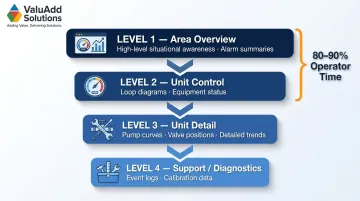
In practice, most operators spend 80–90% of their time at L1 and L2. L3 and L4 exist for exception handling — design them accordingly, not as default views.
Avoid Screen Overloading
Show only the information relevant to the current operational context. For example, a chilled water loop screen should display:
Primary screen (L2):
- Loop schematic diagram
- Chiller on/off status
- Pump run status
- Supply and return temperatures
- System pressure
Detail screen (L3) or pop-up:
- Pump speed (VFD output)
- Motor amperage
- Vibration readings
- Hours run since maintenance
If secondary parameters appear on the primary screen, the operator's eye must filter them out hundreds of times per shift. That's wasted cognitive effort.
Skip the Eye Candy
Screen overloading isn't just about data volume — visual complexity does the same damage. Avoid 3D renderings, complex textures, and unnecessary animations. Realistic graphics add visual distraction without functional value. Research shows that while 3D displays facilitate shape understanding, they hamper an operator's ability to judge relative positions accurately.
The human eye is naturally drawn to movement. A spinning pump impeller or animated flame can delay an operator's detection of a real data-based problem. Use animation only for unacknowledged alarm states—never for normal operation.
Reflect Physical Layout
Operators who move from field work to control rooms carry strong spatial memory — and screen layouts that contradict physical reality force them to mentally remap every interaction. If a reflux drum sits above the distillation column in the plant, it should appear that way on screen, not repositioned for layout convenience. Match the physical world, and the interface becomes intuitive. Fight it, and you create a persistent source of error.
Color Standards and Visual Emphasis
Gray-Scale Base, Color for Abnormal
The core principle of high-performance HMI color philosophy: gray-scale for normal operating conditions, color reserved for abnormal states. When everything on the screen is colorful, nothing stands out.
A muted, neutral background—specifically light gray (RGB 224, 224, 224)—allows anomalies to immediately catch the operator's eye. Light gray works well in brighter modern control rooms, reduces eye strain during long shifts, and provides sufficient contrast for both text and colored indicators.
Semantic Color Scheme
Define a practical semantic color scheme and apply it consistently:
- Gray tones: Equipment outlines, piping, and normal states
- Yellow/amber: Advisory conditions—approaching a limit, not yet requiring action
- Red: Alarm conditions requiring immediate operator response
- Blue: Setpoints, labels, and reference values (non-dynamic)
Red should never appear during normal operation. If it does routinely, the alarm configuration needs correction, not the screen.
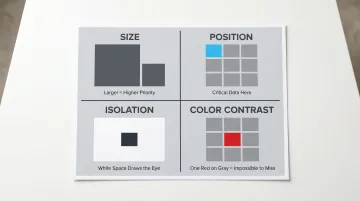
Four Emphasis Techniques
Help operators quickly locate critical information using these four techniques:
- Size: Use larger elements for higher-priority information—scale signals urgency
- Position: Top-left receives the most eye travel in Western reading patterns, making it the right place for critical data
- Isolation: White space around an element draws the eye to it without adding visual noise
- Color contrast: One red element on a gray screen is impossible to miss—that's the goal
Design for Color Vision Deficiency
Approximately 8% of males have red-green color vision deficiency. Color alone should never be the sole indicator of state.
Pair every color change with:
- Shape change (circle → triangle)
- Flashing border (for unacknowledged alarms)
- Symbol (checkmark, X, warning icon)
- Text label ("RUNNING," "STOPPED," "ALARM")
Redundant encoding keeps your HMI readable for every operator on the floor.
Process Flow Piping Color
Lines can be colored by the material they carry to make flow direction and process relationships more intuitive. Follow these guidelines:
- Color by fluid type (steam supply, condensate, process fluid) for quick identification
- Use desaturated, muted tones to stay consistent with the gray-scale base philosophy
- Avoid bright primary colors—vivid piping competes with alarm indicators
Navigation Design and Alarm Management
The Two-Touch Rule
Operators should be able to reach any screen from any other screen within two touches or clicks. Include persistent Home and Alarm Summary buttons on every screen.
Best practices:
- Group screens logically by operational hierarchy (all distillation unit screens under one parent menu)
- Provide direct-access shortcuts for the most frequently used screens
- Avoid deep navigation trees where critical controls require more than three steps to reach
Alarm Management Best Practices
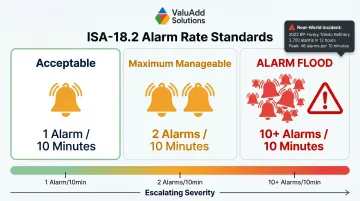
ISA-18.2 defines acceptable alarm rates: approximately 1 alarm per 10 minutes per operator during normal operations, with a maximum manageable target of 2 per 10 minutes. An alarm flood is defined as 10 or more alarms in a 10-minute period.
During the 2022 BP-Husky Toledo Refinery incident, operators faced over 3,700 alarms in 12 hours (peaking at 48 alarms per 10 minutes). Alarm floods overwhelm operators and delay response to critical conditions.
Each alarm message should tell the operator what happened, where it happened, and what to do about it. "High Temperature" gives an operator nothing to act on. "Zone 3 barrel temperature above setpoint—check heater band and thermocouple" gives them a location, a condition, and a next step.
Alarm shelving guidelines:
- Require appropriate authorization (supervisor or engineer level)
- Implement automatic unshelving timers (e.g., 8 hours maximum)
- Log all shelving events with user ID and timestamp
Role-Based Access Control
Define at least three access levels:
| Role | Permitted Actions |
|---|---|
| Operator | Run machine, acknowledge alarms, view all screens |
| Supervisor | Modify setpoints, edit recipes, shelve alarms (with timer) |
| Engineer/Maintenance | Full configuration access, alarm limit changes, interlock bypass |
Set short auto-logout timers (approximately 5 minutes) to prevent elevated permissions from staying active when a supervisor steps away from the console.
Hardware Considerations for Industrial HMI Displays
Environment Drives Hardware Selection
In demanding industrial environments—water treatment facilities, oil and gas operations, processing plants, and manufacturing floors—displays must handle exposure to moisture, dust, chemicals, vibration, and extreme temperatures.
IP Ratings:
- IP65: Protection against dust and low-pressure water jets
- IP66: Protection against dust and powerful water jets
- IP68: Protection against continuous immersion
NEMA Ratings:
- NEMA Type 12: Indoor protection against falling dirt, circulating dust, and light splashing
- NEMA Type 4X: Indoor/outdoor protection against windblown dust, hose-directed water, and corrosion
ValuAdd's industrial displays carry IP68-rated protection, covering wet environments, outdoor installations, and washdown areas.
Display Brightness and Readability
Standard consumer-grade displays (250–350 nits) become unreadable in environments with high ambient light. Industrial displays require 1,000+ nits to remain readable in bright indoor or semi-outdoor installations.
This matters most in partially outdoor installations—common in water treatment and oil and gas—where glare and ambient light change throughout the day. ValuAdd's high-brightness displays reach 1,200 cd/m², keeping process values and alarm states legible even in direct sunlight.
Touchscreen Usability for Gloved Operation
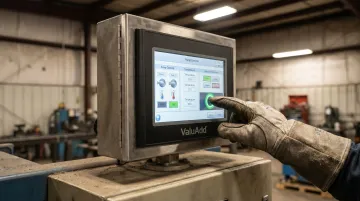
Operators who wear gloves must be able to interact with all touch targets reliably. ISO 9241-9 recommends a button size of approximately 22 mm, based on the distal finger joint of a 95th percentile male. Department of Defense and aviation guidelines recommend target sizes between 15 mm and 25 mm for gloved or high-vibration environments.
Before deployment:
- Test all touchscreen interactions with the actual gloves operators will wear
- Verify that all buttons, sliders, and navigation elements respond consistently
- Ensure minimum spacing between adjacent targets to prevent accidental presses
ValuAdd's industrial HMI displays use resistive touch technology, which registers input reliably even when operators wear heavy industrial gloves, ensuring consistent operation in demanding conditions.
Industrial-Grade Reliability
Industrial-grade displays are engineered for wide temperature ranges (-30°C to 65°C) and continuous operation, offering lifespans of 7 to 10+ years. In contrast, consumer models typically fail within 1 to 2 years when subjected to industrial environments due to inadequate thermal management, lack of optical bonding, and insufficient ingress protection.
ValuAdd's displays feature rugged aluminum construction with certifications for vibration and shock protection, and comply with UL, CE, and FCC standards—making them a practical fit for facilities where unplanned downtime carries real operational cost.
Frequently Asked Questions
How to design a good HMI?
Start by mapping operator tasks and workflows, then apply consistent layout, semantic color use, and hierarchical navigation. The goal: operators should assess process state and respond to abnormal conditions within two seconds of viewing a screen.
What is the standard for HMI design?
ISA-101 is the primary international standard governing HMI design philosophy. The ASM Consortium's High-Performance HMI Handbook is the go-to practical handbook for control room engineers. ISA-18.2 covers alarm management , defining acceptable alarm rates and flood conditions.
What is the best background color for HMI?
Light gray (RGB 224, 224, 224) is the preferred background color. It matches the luminescence of brighter modern control rooms, reduces eye strain during long shifts, and allows colored indicators and alarm states to stand out clearly without competing with background elements.
What skills are needed for HMI design?
HMI designers need a mix of technical and communication skills:
- Industrial process control knowledge and familiarity with operator workflows
- Human factors and visual design principles (hierarchy, color theory, emphasis)
- Hands-on experience with HMI development platforms
- Ability to apply ISA standards in practical screen designs
- Strong communication skills for conducting operator reviews
What is a high-performance HMI?
A high-performance HMI follows ASM Consortium methodology: gray-scale base colors, bright colors reserved for alarms, no decorative graphics, and hierarchical information structure. ASM research found operators detected 48% of abnormal conditions before alarms triggered — a significant improvement over traditionally designed screens.