Introduction
Picture a water treatment operator monitoring dozens of pumps, valves, and chemical dosing systems spread across a 50-acre facility—all from a single touchscreen panel. That's what a Human-Machine Interface (HMI) does: it pulls thousands of data points from sensors, PLCs, and field devices into one visual dashboard, giving operators a clear, actionable picture of what's happening on the floor.
This guide covers what HMI stands for, how these systems work, the main types available today, where they're deployed across industries like water treatment and oil and gas, and how HMI differs from SCADA and PLCs — including what to look for when selecting a unit for your facility.
Worth noting upfront: "HMI" technically applies to any human-device interface, from ATMs to smartphones. This guide focuses only on industrial HMIs used in manufacturing, utilities, and process control environments.
Key Takeaways
- HMIs bridge the gap between complex machines and operators by displaying real-time process data and accepting control inputs
- Common types include panel-mount touchscreens, PC-based systems, and web/mobile interfaces
- Critical sectors include water treatment, oil and gas, manufacturing, and food processing
- HMI handles the visual interface, SCADA manages the broader data system, and the PLC serves as the control brain — all three operate as a coordinated system
- Match your HMI to the environment: verify IP65/66/68 or NEMA 4X ratings, protocol compatibility, and vendor support commitments before buying
What Is an HMI? Definition and Core Concept
A Human-Machine Interface (HMI) is the hardware or software layer that allows an operator to monitor, control, and interact with a machine or automated industrial process. It connects complex control systems to the people running them — converting raw machine data into readable displays, alarms, and controls operators can act on directly.
Scope and Terminology
While technically any interactive screen qualifies as an HMI, in industrial contexts the term specifically refers to operator panels and dashboards used to supervise equipment, processes, and control systems. According to NIST's industrial control system guidelines, an HMI is the hardware or software through which an operator interacts with a controller.
Common alternative names you'll see in vendor documentation:
- Man-Machine Interface (MMI) — historically used but less common today
- Operator Interface Terminal (OIT)
- Local Operator Interface (LOI)
- Operator Terminal (OT)
Regardless of what it's called, every HMI shares one defining capability: two-way communication between operator and machine.
How HMIs Send and Receive Data
An HMI handles bidirectional communication across two directions:
From machine to operator:
- Real-time process variables (temperatures, pressures, flow rates)
- Equipment status indicators (running, stopped, fault)
- Active alarms and warnings
- Historical trend data
From operator to machine:
- Start/stop commands
- Setpoint adjustments
- Mode changes (auto/manual)
- Alarm acknowledgments
Practical Example
Consider a municipal water treatment facility: An operator uses an HMI screen to view the status of intake pumps, monitor flow rates through filtration stages, and track chemical dosing levels in real time. When chlorine levels drop below setpoint, the operator adjusts dosing rates directly from the screen—no need to walk to the chemical feed equipment or manually adjust valves. The HMI sends that command to the PLC, which executes the change immediately.
How Does an HMI Work?
An HMI works by sitting between the operator and the machine—translating raw controller data into readable displays and converting operator inputs into executable commands.
Basic Data Flow Architecture
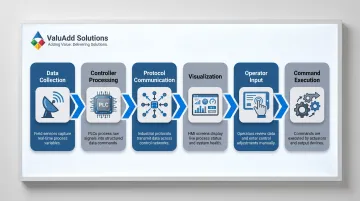
The typical industrial HMI workflow follows this sequence:
- Data Collection: Sensors and field devices (pressure transmitters, temperature probes, flow meters) collect process data
- Controller Processing: Data transmits to a Programmable Logic Controller (PLC) or Distributed Control System (DCS)
- Protocol Communication: The HMI reads from and writes to the PLC using industrial communication protocols
- Visualization: The HMI displays information visually—color-coded status indicators, trend graphs, alarm banners, process diagrams
- Operator Input: The operator issues commands via touchscreen or buttons
- Command Execution: The HMI translates inputs into PLC commands, which drive physical outputs
Communication Protocols
HMIs connect to PLCs and other devices using standardized industrial protocols. Common examples include:
- Modbus RTU/TCP: Uses master/client polling to read and write registers and coils
- EtherNet/IP: Employs the Common Industrial Protocol (CIP) for data exchange with Allen-Bradley PLCs
- OPC-UA: Provides platform-independent, secure communication across heterogeneous systems
- PROFINET: Handles high-speed, deterministic communication for Siemens and other European automation platforms
These protocols govern how data packets are formatted, transmitted, and interpreted—ensuring reliable communication even in electrically noisy industrial environments.
Software Layer and Visualization
The HMI software transforms raw PLC data—voltages, counts, binary states, register values—into comprehensible visualizations:
- Color-coded status indicators (green = running, red = fault, yellow = warning)
- Real-time trend graphs showing process variables over time
- Animated process diagrams (tanks filling, pumps rotating)
- Alarm banners with prioritized notifications
Real-Time Alarming and Alerting
When a monitored variable crosses a defined threshold—tank pressure exceeds safe limits, motor temperature spikes, flow rate drops below minimum—the HMI triggers visual or audible alarms. According to the ANSI/ISA-18.2-2016 standard, HMIs must provide functional capabilities to silence, acknowledge, shelve, and suppress alarms, alongside dedicated summary displays. This engineered alarm management prevents operator overload and ensures critical alerts aren't missed.
What HMI Does NOT Do
That real-time focus is also a scope boundary. HMIs are optimized for operator interaction in the moment—not long-term data management or enterprise integration. They do not typically:
- Store large volumes of historical data long-term
- Connect directly to enterprise databases or ERP systems
- Provide multi-site geographic data aggregation
- Execute complex control logic independently
Those functions belong to SCADA systems, historians, and Manufacturing Execution Systems (MES).
Types of HMI Systems
Industrial HMIs come in several form factors, each optimized for specific deployment scenarios and environmental conditions.
Panel-Mount and Hardware-Based HMIs
Dedicated control panels were the original HMI form factor: physical buttons, switches, selector knobs, and pilot lights. These are still used where touchscreens are impractical due to heavy vibration, chemical exposure, or operators wearing thick gloves.
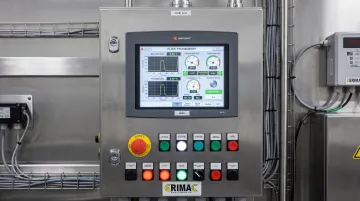
Modern panel-mount touchscreen terminals are flat-panel displays mounted directly at the machine or inside a control cabinet. They're purpose-built to withstand harsh conditions:
- Environmental durability: IP65 (dust-tight, water jet protection), IP66 (high-pressure water jets), or IP68 (continuous immersion) ratings
- Corrosion resistance: NEMA Type 4X compliance for chemically aggressive environments
- Temperature extremes: Operating ranges from -20°C to +70°C
For example, ValuAdd's Cimon HMI product line includes models with IP68 and NEMA Type 4X ratings, designed specifically for demanding water treatment, oil and gas, and food processing environments. These units feature high-brightness displays (up to 1,200 cd/m²) for outdoor visibility and resistive touch panels that work reliably even when operators wear gloves.
PC-Based and Software HMIs
These systems run on industrial PCs or standard computers, offering:
- Greater processing power for complex visualizations
- Larger screen real estate (15" to 24"+)
- Flexible software configuration and customization
- Integration with Windows-based SCADA platforms
- Web-based access: Browser-delivered interfaces (HTML5) run on thin clients, tablets, or smartphones — supporting remote monitoring and multi-site visibility without dedicated hardware
PC-based and web-based HMIs are best suited for control rooms and central monitoring stations where visualization complexity matters more than ruggedization.
Emerging HMI Technologies
These interfaces are moving from pilot projects into active deployment at advanced facilities:
- Mobile and tablet-based HMIs: Allow operators to monitor processes while walking the plant floor
- Voice-activated HMIs: Use natural language processing for hands-free control
- AR/VR-enhanced interfaces: Overlay process data onto physical equipment or provide immersive 3D visualizations
The global HMI market is projected to grow from $5.2 billion in 2023 to $7.7 billion by 2028 at an 8.2% CAGR, driven largely by adoption of web-based architectures and mobile accessibility.
Where Is HMI Used? Key Industrial Applications
HMIs are embedded throughout process industries wherever automated systems require human oversight and intervention.
Manufacturing
HMIs are integrated into production lines to monitor CNC machines, robotic cells, conveyors, and assembly processes. Operators use them to:
- Track production KPIs (units per hour, cycle times, reject rates)
- Manage equipment alarms and respond to faults
- Adjust process parameters (speeds, temperatures, pressures)
- Perform changeovers between product runs
Eli Lilly cut HMI recovery time from 4–8 hours to just five minutes by upgrading to a virtualized HMI architecture—a direct productivity gain driven by a single infrastructure change.
Oil and Gas
HMIs provide critical visibility and control across all three sectors:
- Upstream: Drilling rig monitoring, wellhead control, extraction process oversight
- Midstream: Pipeline monitoring, pump station control, leak detection
- Downstream: Refinery process control, distillation column monitoring, safety system interfaces
Because many oil and gas processes involve hazardous materials and cannot be safely approached during operation, HMIs enable remote supervision from control rooms. TotalEnergies saved €1.5 million and avoided 64 days of downtime in a single year using advanced HMI and data visualization systems—a result that illustrates how control room visibility directly protects revenue.
Water and Wastewater Treatment
Municipal utilities use HMIs to coordinate multi-stage treatment processes:
- Intake pumping and raw water monitoring
- Chemical dosing and coagulation control
- Filtration system management
- Disinfection process oversight
- Distribution system monitoring
HMIs allow a small operations team to supervise infrastructure spread across miles from a central control panel. The City of College Station wastewater facility achieved a 10% decrease in downtime and 25% improvement in response times after modernizing their HMI system with mobile alarm notifications and remote troubleshooting capabilities—an environment where ruggedized, IP-rated HMI displays rated for outdoor installation and wet conditions are not optional, but essential. This is a primary sector ValuAdd serves.
Additional Critical Sectors
Energy and Power Generation:
- Boiler control and monitoring
- Turbine management systems
- Grid distribution oversight
- Renewable energy (wind farm, solar array monitoring)
Chemical Processing:
- Reactor temperature and pressure control
- Distillation column management
- Batch process recipe execution
- Hazardous material handling
Food and Beverage:
- Pasteurization process control
- Packaging line monitoring
- CIP (Clean-in-Place) system management
- Recipe management and changeover
Across every sector, the pattern holds: when a process is too complex, too hazardous, or too dispersed for direct manual control, an HMI bridges the gap between the operator and the system.
HMI vs. SCADA and PLC: Understanding the Relationships
These three technologies work together but serve distinct roles. Each occupies a specific layer of the control architecture, and conflating them leads to poor system design decisions.
HMI vs. SCADA
The HMI is the visual interface layer—the screen operators see and interact with. SCADA (Supervisory Control and Data Acquisition) is the broader system that collects data from multiple controllers, logs historical information, connects to enterprise databases, and provides supervisory control across wide geographic areas.
The HMI is the dashboard; SCADA is the entire vehicle management system.
In practice, an HMI often operates as the front-end display component of a larger SCADA system. A water utility might have:
- Local HMIs at each pump station (providing operator visibility at that specific site)
- A central SCADA system aggregating data from all stations (providing utility-wide visibility, historical trending, and enterprise reporting)
HMI vs. PLC
A PLC (Programmable Logic Controller) is the control brain—it executes logic, performs calculations (PID control loops), reads sensors, and drives outputs (opens valves, starts motors, triggers alarms). The HMI is the face of that process, displaying what the PLC is doing and giving operators a mechanism to issue new instructions.
They are complementary, not competing:
- The PLC controls the physical process autonomously
- The HMI provides a window into that process and a mechanism for operator intervention
Some modern units combine PLC logic and HMI display in a single integrated device for simple applications.
The Complete Control Architecture
Industrial systems typically follow a hierarchical structure aligned with the Purdue Model and ISA-95 standards:
| Level | Component | Primary Responsibility |
|---|---|---|
| Level 0-1 | Field devices & sensors | Physical sensing and actuation |
| Level 1 | PLC | Execute control logic, PID loops, interlocks |
| Level 2 | HMI | Local operator visualization and manual control |
| Level 2-3 | SCADA | Multi-site data aggregation, historical logging, supervisory control |
| Level 3 | MES | Manufacturing operations management, production scheduling |
| Level 4 | ERP | Enterprise resource planning, business systems |
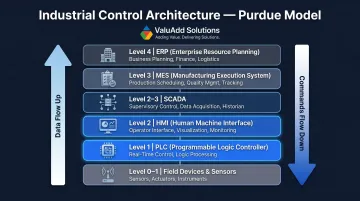
Data flows upward: Sensors → PLC → HMI → SCADA → MES → ERP
Commands flow downward: Operator uses HMI → HMI sends command to PLC → PLC drives field device
Keeping these boundaries clear during system design saves significant rework. An HMI specified to handle multi-site data aggregation will underperform; a PLC tasked with visualization will create maintenance headaches. Right-sizing each component to its layer is where solid industrial architecture starts.
What to Look for When Choosing an Industrial HMI
Selecting the right HMI requires evaluating far more than screen size and resolution. Focus on these critical factors:
Environmental Durability and Protection Ratings
The HMI must survive the physical conditions of its installation site. Two rating systems matter:
IP Ratings (IEC 60529):
- IP65: Dust-tight, protected against water jets (6.3 mm nozzle)—suitable for most indoor industrial use
- IP66: Dust-tight, protected against powerful water jets (12.5 mm nozzle)—suitable for washdown areas
- IP68: Dust-tight, protected against continuous immersion—required for outdoor installations and extreme wet environments
NEMA Ratings (NEMA 250):
- NEMA Type 4X: Provides equivalent protection to IP66 plus guarantees corrosion resistance—critical for outdoor marine environments, chemical exposure, and food processing washdown areas
IP ratings focus strictly on dust and liquid ingress, while NEMA 4X also certifies corrosion resistance—a factor not explicitly covered by IP codes alone.
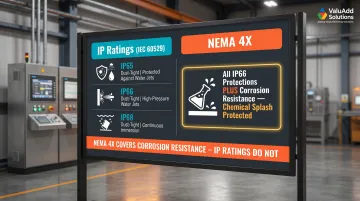
ValuAdd's portfolio includes HMI displays certified to IP65, IP66, IP68, and NEMA Type 4X standards, specifically engineered for water treatment, oil and gas, and food processing environments where both water exposure and chemical resistance are essential.
Protocol Compatibility and Connectivity
The HMI must natively support the communication protocols used by your existing PLCs and control hardware. Before procurement:
- Verify protocol support: Confirm the HMI supports Modbus RTU/TCP, EtherNet/IP, PROFINET, or OPC-UA as required
- Check PLC brand compatibility: Ensure the vendor provides drivers or integration support for your specific PLC models (Siemens, Allen-Bradley, Schneider Electric, Mitsubishi, etc.)
- Consider future-proofing: OPC-UA is increasingly preferred for heterogeneous environments due to robust security and rich information modeling
Many of ValuAdd's Cimon HMI units feature dual Ethernet ports for network redundancy and support multiple serial communication interfaces (RS-422/485, RS-232C), ensuring compatibility with a wide range of industrial control systems.
Scalability, Usability, and Vendor Support
Beyond connectivity, long-term value depends on how well the HMI fits your operational growth and the support behind it. Evaluate:
Scalability:
- Can the system handle increased process complexity without full replacement?
- Does the software licensing model support expansion?
- Is the hardware modular or upgradeable?
Usability:
- Is the display readable under your facility's lighting? (High-brightness models rated 1,200 cd/m² are essential for outdoor or high-ambient-light applications)
- Can operators interact while wearing gloves? (Resistive touch works where capacitive touch fails)
- Is the programming software intuitive for your technical staff?
Vendor Support:
- Does the vendor offer reliable technical support beyond product sales?
- Is documentation comprehensive and accessible?
- Does the supplier maintain local inventory with fast delivery?
- What is the product lifecycle commitment—will parts be available in 5–10 years?
ARC Advisory Group recommends evaluating supplier track record, software scalability, and licensing models as core procurement criteria. ValuAdd's technical team provides pre-sales support, integration guidance, and troubleshooting assistance across water treatment, manufacturing, and industrial automation applications—bringing application-specific expertise to each project rather than simply fulfilling orders.
Frequently Asked Questions
How does the Human Machine Interface work?
An HMI reads data from PLCs and field devices via industrial communication protocols, displays that data as visualizations (gauges, trends, alarms) on-screen, and translates operator commands back into PLC instructions—making it the two-way bridge between operator and machine.
What is HMI used for?
HMIs monitor process variables (temperatures, pressures, flow rates), manage alarms, and handle equipment start/stop commands and setpoint adjustments. They give operators centralized visibility into complex industrial operations from a single interface.
What is an example of HMI?
A touchscreen panel mounted on a water pump station showing real-time tank levels and pump status, or a control room display in a manufacturing plant showing production line performance and active equipment alarms.
What is HMI vs SCADA?
HMI is the visual interface operators interact with—the display and controls. SCADA is the broader system that collects, stores, and analyzes data from across an entire facility or multiple sites. HMI typically operates as one component within a SCADA architecture.
What is a PLC and HMI?
A PLC is the programmable controller that executes machine logic, runs control loops, and drives physical outputs. The HMI is the operator-facing screen that displays PLC data and allows humans to issue commands.
What does HMI stand for in healthcare?
In healthcare, HMI stands for Human-Machine Interface and refers to the user interfaces on medical devices—infusion pumps, patient monitors, diagnostic equipment—that clinical staff use to read data and configure settings. These interfaces follow strict usability standards, including IEC 62366-1:2015.