Introduction
A single HMI panel mismatch can cost a facility tens of thousands of dollars — in emergency integration work, unplanned downtime, and operator errors that accumulate quietly across shifts. For plant engineers and system integrators in U.S. manufacturing, water treatment, and oil & gas, the panel selection decision carries that kind of weight.
The HMI is the interface between your operators and every critical process behind it. Get it right, and you gain real-time visibility, reliable control, and infrastructure that grows with your operation.
The numbers reflect how seriously industry is taking this: the global HMI market reached $5.2 billion in 2023 and is projected to hit $7.7 billion by 2028, growing at 8.2% annually. Much of that investment is driven by facilities replacing outdated push-button panels with touchscreen interfaces capable of handling multi-axis process data and remote diagnostics.
This guide breaks down what to evaluate before you buy — from display specs and ingress protection ratings to protocol compatibility and software ecosystems — so you can match the right panel to your actual application.
Key Takeaways
- HMI panels connect operators to PLCs, SCADA systems, and production equipment through touchscreen interfaces
- Leading 2026 options include Siemens SIMATIC Comfort Panels, Rockwell PanelView Plus 7, Schneider Electric Harmony, Mitsubishi GOT2000, and ABB CP600-Pro
- Key selection factors: IP/NEMA ratings, protocol compatibility, display brightness, and software ecosystem depth
- Minimum IP65 protection is baseline; NEMA 4X is essential for corrosive or washdown zones
- Match your HMI to your industry — process operations and discrete manufacturing have different durability and speed requirements
What Are HMI Panels and Why They Matter in Industrial Automation
An HMI panel is a touchscreen or button-based operator interface that allows plant personnel to monitor equipment status, send commands, view alarms, and log data in real time—functioning as the dashboard for your entire automation system.
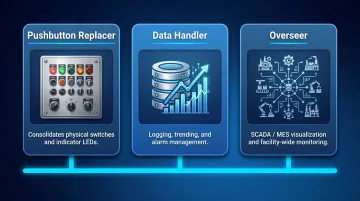
Three Functional Types of Industrial HMIs
Understanding HMI roles helps you match the right panel to your application:
- Pushbutton Replacer: Consolidates mechanical LEDs, switches, and buttons into a single visual interface, simplifying control panels and reducing wiring complexity
- Data Handler: Manages high-volume data logging, trending, alarm management, and recipe control—essential for applications requiring constant feedback and historical records
- Overseer: Provides SCADA and MES-level visualization for monitoring and controlling entire facilities or multiple sites simultaneously
How HMI Fits Within the Automation Stack
Teams often conflate HMI, PLC, and SCADA roles when scoping projects. Here's the functional breakdown:
| Layer | Role | What It Does |
|---|---|---|
| PLC | Control Logic | Reads sensors, controls outputs, runs the automation program |
| HMI | Operator Interface | Visualizes process data, accepts operator input |
| SCADA | Supervisory Oversight | Aggregates data across systems, provides enterprise-level reporting |
Each layer handles a distinct job. Specifying the right HMI starts with knowing which layer your operators actually need to interact with.
Best HMI Panels for Industrial Automation in 2026
These five panels were selected based on field-proven performance across U.S. industrial applications. Selection criteria included:
- Reliability in demanding operating environments
- Comprehensive protocol support for multi-vendor plants
- Strong environmental ratings (IP65 or better)
- Mature software ecosystems with long-term parts availability
- Fit for manufacturing, water treatment, oil & gas, and system integration
Siemens SIMATIC HMI Comfort Panels
Siemens SIMATIC Comfort Panels are the most widely deployed industrial HMI family globally, with direct integration into TIA Portal software and deep compatibility with SIMATIC PLCs across discrete manufacturing, process automation, and infrastructure projects.
Key strengths include high-resolution widescreen displays up to 22", multi-touch capacitive operation, and unified engineering through TIA Portal. Extensive lifecycle parts support and a global service network make this the go-to choice for U.S. manufacturers running multi-site deployments or building OEM equipment for export.
| Specification Category | Details |
|---|---|
| Key Technical Specs | Screen sizes: 4" to 22" (Key and Touch options) Resolutions up to 1920×1080 (FHD) x86 processor architecture Windows CE 6 / Windows Embedded Compact 2013 OS |
| Communication Protocols | PROFINET, PROFIBUS, EtherNet/IP, Modbus TCP, OPC UA Client/Server |
| Environmental & Certifications | Front: IP65 / Rear: IP20 NEMA Type 4, 4X (front panel) CE, cULus, ATEX Zone 2/22, IECEx, Class I Div 2 |
Rockwell Automation PanelView Plus 7
The PanelView Plus 7 leads North American discrete manufacturing—particularly automotive, food & beverage, and packaging—owing to tight integration with Allen-Bradley Logix PLCs and FactoryTalk View ME software.
Native FactoryTalk integration eliminates programming friction, and IP66-rated washdown models extend deployment to harsh environments. Screen sizes run from 4" to 19", and the largest U.S. integrator network means local support is rarely hard to find — a real advantage for facilities already running Rockwell infrastructure.
| Specification Category | Details |
|---|---|
| Key Technical Specs | Screen sizes: 4.3" to 19" (Standard and Performance lines) Color TFT LCD displays Standard: Windows CE 6.0 / Performance Series B: Windows 10 IoT Core Performance memory: 4 GB RAM / 19.87 GB storage |
| Communication Protocols | EtherNet/IP (with Device Level Ring support), Modbus/Serial via KEPServer drivers, ControlNet, DH+ |
| Environmental & Certifications | IP54 or IP66 front panel NEMA 12, 13, 4X (indoor use only) cULus, CE, Class I Div 2, ATEX Zone 2/22, IECEx |
Schneider Electric Harmony (Magelis) Advanced Panels
Schneider Electric's Harmony advanced HMI panels offer exceptional protocol flexibility, making them the preferred choice in multi-vendor environments including water treatment facilities, utilities, and process plants where EcoStruxure architecture is already deployed.
Native Vijeo Designer compatibility and multi-protocol support across Modbus, EtherNet/IP, PROFIBUS, and OPC UA make these panels straightforward to deploy in mixed-vendor plants. Bright, high-contrast displays work well in both control rooms and field enclosures, and Harmony's track record in regulated industries — particularly water and wastewater — gives specifiers confidence during compliance reviews.
| Specification Category | Details |
|---|---|
| Key Technical Specs | Screen sizes: 7" to 15" Resolutions: 800×480 (7") to 1280×800 (12.1") Single and multi-touch analog resistive technology Modular architecture |
| Communication Protocols | Modbus TCP/RTU, EtherNet/IP, PROFIBUS, OPC UA, native Schneider PLC compatibility |
| Environmental & Certifications | Front: IP66/IP67 NEMA Type 4X (front panel) UL 508, ANSI/ISA 12-12-01, CSA C22.2 No 213 Class I Div 2, CE, cULus |
Mitsubishi Electric GOT2000 Series
Mitsubishi Electric's GOT2000 Series is widely deployed in U.S. and global manufacturing for its compact, vibration-resistant design, exceptional multi-brand PLC compatibility, and fast display refresh rates suited to high-speed production environments.
Support for over 1,000 PLC and device drivers — covering Allen-Bradley, Keyence, Omron, Siemens, and more — sets this series apart from brand-locked alternatives. A wide operating temperature range (0°C to 55°C), long LED backlight life (50,000 hours), and consistent spare parts availability make it a practical choice for OEM equipment builders and mixed-brand plant environments.
| Specification Category | Details |
|---|---|
| Key Technical Specs | Screen sizes: 3.8" to 15" Resolutions: VGA (640×480), SVGA (800×600), XGA (1024×768) Operating temperature: 0°C to 55°C LED backlight rated 50,000 hours |
| Communication Protocols | 1,000+ device drivers including Mitsubishi, Allen-Bradley, Keyence, Omron, Siemens Ethernet, RS-232, RS-422/485, USB Host/Device, SD Card |
| Environmental & Certifications | Front: IP67F (oil resistant per JIS C 0920) Inside panel: IP2X CE, UL, cUL, Class I Division 2 (model dependent) |
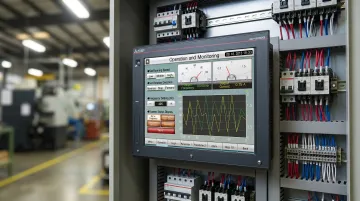
ABB CP600-Pro Series
ABB's CP600-Pro series is engineered for demanding applications in oil & gas, power distribution, and heavy manufacturing where ABB drives, motors, and automation systems are already integrated—offering cohesive single-vendor control architecture.
A built-in web server enables remote access without additional hardware, and high-brightness displays (300–400 cd/m²) hold up in outdoor or high-ambient-light installations where standard panels wash out. IP66-rated front enclosures, ABB Automation Builder software support, and Modbus/OPC UA compatibility round out a platform designed for heavy-duty, long-cycle deployments.
| Specification Category | Details |
|---|---|
| Key Technical Specs | Screen sizes: 5" to 21.5" Brightness: 300-400 cd/m² Multi-touch PCAP real glass technology ARM Cortex-A9 quad-core 800 MHz processor / Linux RT OS 2 GB RAM, 8 GB Flash |
| Communication Protocols | OPC UA Client/Server, Modbus TCP/RTU, EtherNet/IP, PROFIBUS Up to 3× Ethernet, RS-232/485/422, 2× USB 2.0, SD card Web-based access capability |
| Environmental & Certifications | Front: IP66 / Rear: IP20 cULus Hazardous Locations, CE, FCC |
Key Factors to Consider When Selecting an Industrial HMI Panel
Environmental Protection Ratings
IP and NEMA ratings are non-negotiable in industrial settings. Understanding the specific protection levels ensures your panel survives the actual operating environment.
IP rating hierarchy:
- IP65: Baseline for dust-tight protection and resistance to water jets from any direction—suitable for most indoor industrial environments
- IP66: Protection against powerful water jets—required for washdown zones common in food processing and water treatment
- IP67: Dust-tight with protection against immersion up to one meter
- IP68: Complete dust protection and resistance to prolonged water immersion—essential for high-pressure wash applications
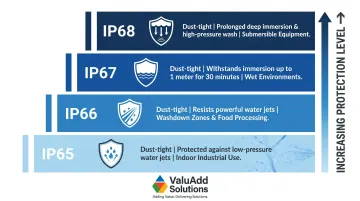
NEMA 4X adds corrosion resistance for chemical environments, protecting against windblown dust, rain, splashing water, hose-directed water, and corrosive agents. Critical note: verify whether the NEMA 4X rating applies to indoor-only or indoor/outdoor use—Rockwell's NEMA 4X rating, for example, is explicitly for indoor use only.
Panels from ValuAdd carry UL Listed, CE, and FCC certifications, confirming compliance with U.S. safety and electromagnetic standards required in water treatment, oil and gas, and manufacturing facilities.
Communication Protocol Compatibility
Native protocol mismatches between your HMI and existing PLCs, VFDs, or SCADA systems create integration costs that often exceed the panel price itself.
Verification checklist:
- Confirm native support for your plant's specific protocols: EtherNet/IP, Modbus TCP/RTU, PROFINET, PROFIBUS, or OPC UA
- Verify physical port availability: Ethernet (preferably dual ports for redundancy), RS-485, USB
- Check driver support for all connected devices, not just your primary PLC brand
- Confirm whether protocol conversion requires additional hardware or software licenses
Most enterprise-grade panels now ship with multi-protocol support as standard. Siemens Comfort Panels support PROFINET, PROFIBUS, EtherNet/IP, Modbus TCP, and OPC UA. ABB CP600-Pro panels embed OPC UA client/server capabilities alongside multi-Ethernet and serial connections.
Display Quality and Touch Type
Screen performance directly affects operator effectiveness, particularly in demanding industrial environments.
Brightness determines whether operators can read screens without error. Match your nit rating to the installation:
- 400 nits minimum for indoor industrial environments with typical factory floor lighting
- 700+ nits for high-ambient-light environments or control rooms with significant window exposure
- 1,000+ nits for outdoor installations or direct sunlight exposure
Touch technology is a separate decision driven by your operating conditions:
- Resistive touch: Works with gloves, stylus, or bare fingers; more durable in dirty or wet environments; preferred for traditional industrial applications
- Capacitive touch: Requires bare fingers or conductive gloves; enables multi-touch gestures and smoother navigation; ABB's PCAP glass screens are a current example of this trend in industrial panels
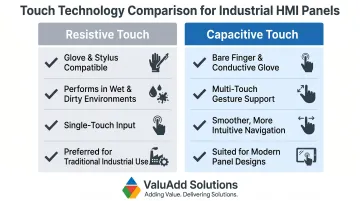
Resolution matters for complex visualization: 1280×800 (WXGA) is adequate for most applications, while 1920×1080 (FHD) provides superior clarity for detailed process graphics or larger screen sizes above 15 inches.
Processing Power and Software Platform
In data-intensive applications, an underpowered HMI shows up as screen lag, delayed alarm response, and logging gaps—all of which degrade process visibility at the worst moments.
Hardware considerations:
- Match CPU speed, RAM, and storage to project complexity
- Data-logging applications require adequate storage (8 GB minimum for extended logging)
- Multi-screen projects with complex graphics benefit from faster processors
Software capabilities are equally important and often overlooked during hardware-focused evaluations.
Software platform evaluation:
- Assess tag management capabilities for your project scale
- Verify alarm handling, acknowledgment, and historical logging features
- Confirm data-logging functionality and export options
- Evaluate remote access and IIoT connectivity options
Operating system choice impacts long-term lifecycle: Windows 10 IoT Enterprise LTSC 2021 provides support until January 2032, while Windows 11 IoT Enterprise LTSC 2024 extends support to October 2034. Proprietary RTOS and Linux-based systems offer deterministic performance and faster boot times but may limit software flexibility.
Scalability and IIoT Readiness
Panels selected today will likely need to connect with MES systems, cloud SCADA, or edge computing platforms within their operational lifespan. Verify these capabilities before purchase rather than after deployment.
Future-proofing checklist:
- Built-in web server: Enables browser-based monitoring without dedicated SCADA software
- OPC UA support: Industry-standard protocol for IIoT and enterprise system integration
- Native IIoT gateway functionality: Reduces need for separate edge devices
- Adequate processing headroom: Allows software upgrades without hardware replacement
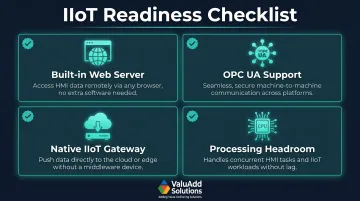
ABB CP600-Pro and Siemens SIMATIC Comfort Panels both offer OPC UA client/server capabilities, positioning them well for evolving connectivity requirements.
How We Selected the Best HMI Panels
Each panel in this guide was evaluated across five dimensions relevant to real industrial deployments:
- Environmental durability — IP/NEMA ratings and relevant certifications
- Communication flexibility — protocol breadth and native driver support
- Software ecosystem maturity — ease of development, licensing, and scalability
- Application suitability — fit for manufacturing, water treatment, oil & gas, and system integration
- Long-term vendor support — parts availability and U.S. market presence
Common Selection Mistakes
These are the most common—and most avoidable—mistakes buyers make:
- Over-specifying screen size while ignoring IP ratings, resulting in panels that fail in actual operating conditions
- Choosing panels based solely on PLC brand loyalty without verifying protocol compatibility with all connected devices (VFDs, instruments, third-party equipment)
- Failing to evaluate the software platform until after hardware is ordered, leading to costly programming rework
Brand vs. Application Fit
Brand reputation alone does not determine the right choice. A Siemens panel only makes sense if your control architecture supports it and your team has TIA Portal expertise — otherwise, a well-specified mid-tier panel with the right certifications and protocol support will deliver better results.
Evaluate for application fit first: required IP rating, communication protocols, software familiarity, and vendor support in your region. Brand follows from that, not the other way around.
Conclusion
Selecting the right HMI panel comes down to fit, not brand recognition. The panel that works for your operation is the one that matches your environment, communicates reliably with your control architecture, meets compliance requirements, and scales as your needs change.
Validation steps before purchase:
- Confirm IP/NEMA ratings against actual site conditions (dust levels, washdown frequency, temperature extremes)
- Verify software licensing structure and update commitments with vendors
- Conduct pilot testing for operator usability before finalizing multi-unit deployments
If those steps surface questions about IP ratings, compliance certifications, or system integration, ValuAdd can help. ValuAdd supplies industrial displays and programmable control systems with IP65, IP66, and IP68 protection — UL Listed, CE, and FCC compliant — for manufacturing, water treatment, and oil & gas applications. Contact ValuAdd to discuss your application requirements.
Frequently Asked Questions
How do I choose the right industrial HMI for my needs?
Start by documenting your environment (IP/NEMA requirements), communication protocols used by your PLCs and devices, operator interface needs (screen size, touch type), and software compatibility. Shortlist panels that meet all criteria rather than selecting on brand or price alone.
What makes a good industrial HMI?
A good industrial HMI combines adequate environmental protection (minimum IP65), reliable communication with connected devices, an intuitive operator interface, a capable software platform, and long product lifecycle with vendor support. How it performs on the plant floor matters more than any specification sheet.
What is an example of an industrial use of HMI?
A water treatment plant operator uses an IP66-rated HMI to monitor pump speeds, view VFD status, respond to flow rate alarms, and log process data in real time—replacing hundreds of individual indicator lights and manual logbooks with a single, comprehensive interface.
Who are the top HMI manufacturers?
Siemens, Rockwell Automation (Allen-Bradley), Schneider Electric, Mitsubishi Electric, and ABB rank among the top global HMI manufacturers. Rockwell leads in North American installations, while Siemens is prevalent across European facilities; all five offer broad product lines and regional support.
What is the most common operating system used for industrial HMI?
Windows IoT Enterprise (formerly Windows Embedded) is the most common OS in mid-to-high-end industrial HMI panels, favored for its broad software compatibility and established development toolchains. Entry-level and dedicated panels typically run proprietary real-time operating systems (RTOS), which offer faster boot times and deterministic performance.
What are the 4 stages of HMI design?
The four stages are:
- Requirements definition — document process variables, alarms, and user roles
- Conceptual design — establish layout and navigation structure
- Detailed design — build screens, map tags, and configure alarm logic
- Testing and validation — verify usability and function against the live control system