Introduction
In industrial environments, selecting the wrong HMI touch panel can trigger operator errors, missed inputs, and unplanned downtime — often because the screen fails when workers are wearing gloves, surfaces are wet, or ambient light overwhelms visibility. The stakes are far higher than in consumer electronics: unplanned downtime costs the world's 500 largest companies approximately $1.4 trillion annually, with human error causing 23% of these incidents.
Those numbers make panel selection a real engineering decision. Resistive and capacitive HMI panels differ fundamentally in how they detect touch, how they perform under environmental stress, and what they cost over their operational lifetime — each tradeoff connects directly to production uptime and maintenance overhead.
This article covers how each technology works, a side-by-side comparison, and a practical decision framework for industrial environments including manufacturing, oil and gas, water treatment, and food processing.
Key Takeaways
- Resistive panels respond to physical pressure; capacitive panels detect changes in an electrostatic field from a conductive object
- Resistive excels in harsh, contaminated, or wet environments and works reliably with gloves or styluses
- Capacitive delivers better display clarity, multi-touch support, and longer surface life in controlled environments
- Key decision factors: glove type, environmental exposure, interface complexity, and total ownership cost
- Glove-compatible PCAP is making capacitive panels viable in more industrial settings
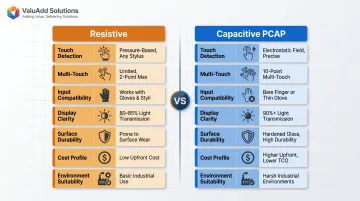
Resistive vs. Capacitive Touch HMI: Quick Comparison
| Attribute | Resistive | Capacitive (PCAP) |
|---|---|---|
| Touch Detection Method | Physical pressure closes circuit between two ITO-coated conductive layers | Electrostatic field changes detected by sensor grid beneath glass surface |
| Multi-Touch Support | No – single-point input only | Yes – supports 10+ simultaneous touch points |
| Input Compatibility | Any object: gloved fingers, styluses, bare hands, tools | Requires conductive object; modern industrial PCAP supports gloves up to 5 mm with proper tuning |
| Display Clarity | 80-85% light transmission; multiple layers reduce brightness | 90%+ light transmission; higher optical clarity and brightness due to fewer layers |
| Surface Durability | 1-35 million touches (standard); 200+ million (specialized GFG) | 50+ million touches; Mohs 7 glass hardness resists scratching |
| Typical Cost | Lower upfront cost; budget-friendly for multiple control points | Higher initial investment; premium pricing due to glass materials |
| Environment Suitability | Harsh, wet, dusty, contaminated conditions; heavy glove use | Controlled or IP-rated environments; modern variants handle moisture and light gloves |
| Maintenance/Recalibration | Periodic recalibration required; surface film degrades over time | Drift-free operation; minimal recalibration needed |
Note: Both technologies are available in IP65, IP66, and IP68-rated enclosures, as well as NEMA 4X variants. Evaluate enclosure protection separately from touch technology when specifying panels for harsh environments.
What is Resistive Touch HMI?
Resistive touch technology operates through mechanical simplicity: two ITO-coated conductive layers separated by a small air gap. When the top layer is pressed with sufficient force, the layers make contact at the touch point, and the controller determines X/Y coordinates from the resulting voltage measurement. This predictable mechanical behavior makes resistive panels reliable in field conditions where electronic sensing might fail.
Core Industrial Advantages:
- Works with any input — heavy-duty gloves, styluses, tools, or bare fingers all register accurately
- Contamination resistant: dust, moisture, oils, and surface condensation don't interfere with pressure-based detection
- Lower per-unit cost — supports budget-sensitive deployments across multiple control points on a plant floor
- Proven field reliability: decades of industrial deployment establish known performance parameters
Resistive Subtypes
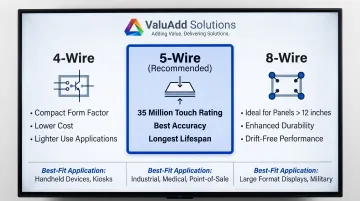
Three configurations dominate industrial HMI applications:
4-Wire: Both layers measure voltage. Cost-effective for compact sizes but less durable under heavy industrial use. Suitable for applications with lighter touch requirements.
5-Wire (Most Common): The stable bottom layer measures X and Y axes while the top layer only detects voltage. This configuration is the most common recommendation for industrial HMI use due to better accuracy and durability under repeated use — tested to 35 million touches in standard implementations.
8-Wire: Similar to 4-wire but adds four sensing points to compensate for voltage falloff in larger screens, improving accuracy. Best for panels larger than 12 inches where precision matters.
Limitations That Affect HMI Performance
- No multi-touch or gesture support — limits interface design to simple point-select interactions
- Reduced optical clarity — multiple film layers reduce display brightness (typically 80-85% light transmission), which becomes problematic in high-ambient-light industrial environments
- Surface degradation — repeated pressing degrades the top film over time, necessitating periodic recalibration — a maintenance overhead in 24/7 operations
- Mechanical wear — standard implementations range from 1 million to 35 million touches before replacement
Use Cases of Resistive Touch HMI
Resistive panels fit perfectly in workflows where environmental conditions or operator PPE make capacitive sensing impractical:
Manufacturing Floor Control: Terminals where operators handle materials with heavy rubber or leather gloves. The 5-wire resistive panels maintain ±2% touch accuracy regardless of glove thickness.
Outdoor Control Kiosks: Oil and gas sites where temperature extremes (-20°C to +70°C), condensation, and direct sunlight exposure require predictable touch response. ValuAdd's CM-eXT2-12W-R-DF operates reliably across this temperature range with IP68 protection.
Food and Beverage Processing: Washdown environments where panels face daily exposure to liquid splatter, steam, and high-pressure cleaning. The Armagard washdown HMI workstation utilizes 24-inch resistive screens in NEMA 4/4X stainless-steel cabinets, allowing operators to work with gloves while protecting hardware from jet washing.
Rugged Field Instrumentation: Processing plants where contamination from dust, chemical vapors, or surface condensation is constant. Resistive panels continue functioning when moisture would cause false inputs on standard capacitive screens.
Resistive technology holds its ground in heavy manufacturing, food processing, chemical plants, and legacy automation systems — anywhere single-point input suffices and the environment is punishing. Where those conditions don't apply, capacitive panels offer a different set of tradeoffs.
What is Capacitive Touch HMI?
Capacitive touch technology works through electrostatic field sensing. A glass panel coated with a transparent conductive layer (typically ITO) maintains a constant electrostatic field. When a bare finger touches the surface, localized capacitance disruption is detected by a sensor grid, and the controller maps the precise coordinate.
Projected Capacitive (PCAP) is the dominant variant in industrial HMI applications today.
Core Industrial Advantages:
- Supports multi-touch gestures for zooming into process diagrams, navigating SCADA workflows, and manipulating visualizations
- Tempered glass (Mohs 7 hardness) withstands over 50 million touches without surface wear
- 90%+ light transmission improves readability in bright control rooms and partially lit environments
- No moving parts or flexible films means longer service life under continuous industrial use
- Maintains accuracy without periodic recalibration cycles
Limitations Relevant to Industrial Environments
Standard capacitive panels historically faced three critical challenges:
- Glove incompatibility — non-conductive gloves or standard styluses don't register input
- Moisture sensitivity — water droplets or high humidity can trigger false inputs
- EMI vulnerability — high electromagnetic interference environments may disrupt sensing
The Modern Industrial Evolution
Glove-compatible PCAP technology, water-rejection firmware, and improved EMI shielding are now standard in industrial-grade capacitive HMI panels. Controllers like the Microchip maXTouch feature specific "Glove Detection" algorithms that support:
- Multi-finger glove touches up to 1.5 mm thickness
- Single-finger touches up to 5 mm thickness through 6 mm glass
- Water rejection that prevents false touches from drops up to 22 mm in diameter
- EMI shielding tested to EN 61000-4-2 standards (withstanding up to 15 kV electrostatic discharge)
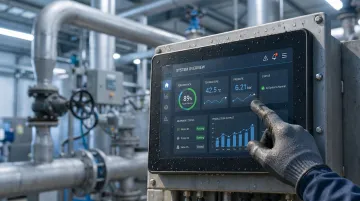
Industrial panels like ValuAdd's high-brightness industrial displays with IP65, IP66, and IP68 protection are purpose-built to address the environmental sensitivity concerns historically associated with capacitive touchscreens — making them viable for demanding industrial settings where this technology was previously unsuitable.
Use Cases of Capacitive Touch HMI
Capacitive panels excel in workflows requiring complex operator interaction and high display quality:
Water Treatment and Municipal Utility Control Rooms: Bare-hand operation pairs well with multi-touch SCADA navigation. Revere Control Systems' municipal water treatment upgrade managed 26,000 tags across 10 processes, achieving a 10% improvement in operational efficiency.
Pharmaceutical and Food-Grade Manufacturing: Clean room protocols allow bare-hand operation. High optical clarity (90%+ light transmission) ensures operators can read critical process parameters and alarms accurately.
Modern Automated Assembly Lines: Complex operator interfaces requiring multi-touch navigation to access nested menus, zoom into assembly diagrams, or manipulate digital work instructions efficiently.
Oil and Gas Control Room SCADA Displays: High-brightness displays reduce eye strain during 12-hour shifts, and multi-touch allows operators to move quickly through hundreds of process points without gloves.
Market Adoption: The capacitive segment is expanding rapidly in industrial markets due to advantages in scratch resistance, durability, and multi-touch functionality. As glove-compatible PCAP and water-rejection firmware close the remaining performance gaps, the technology is becoming the default choice across most industrial sectors.
Resistive vs. Capacitive HMI: Which Panel Is Right for Your Application?
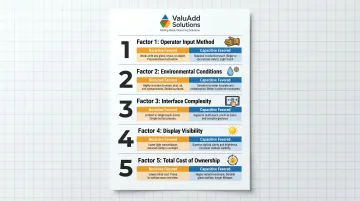
Engineers should evaluate five key factors before specifying an HMI panel:
1. Operator Input Method
- Heavy-duty rubber or leather gloves: Resistive is the proven choice
- Nitrile or thin latex gloves: Modern glove-compatible PCAP works reliably (verify with specific glove testing)
- Bare hands: Capacitive offers superior user experience
- Stylus use required: Resistive works with any stylus; capacitive requires a conductive stylus
2. Environmental Conditions
- Heavy contamination (oils, particles, liquids): Resistive excels
- Water exposure or washdown requirements: Resistive or IP68-rated PCAP with water-rejection firmware
- Dust without moisture: Both work; verify IP rating matches environment
- Controlled environments: Capacitive preferred for display clarity
- Outdoor installations: Both available in IP66/IP68 enclosures; resistive more forgiving with moisture
3. Interface Complexity
- Single-point inputs only (start/stop buttons, navigation): Resistive sufficient and cost-effective
- Multi-touch required (pinch-to-zoom, two-finger scroll, gesture controls): Capacitive necessary
- Complex SCADA navigation with nested menus: Capacitive improves operator efficiency
- Simple fixed-layout process screens: Resistive appropriate
4. Display Visibility Requirements
- Bright control rooms or outdoor locations: Capacitive offers 90%+ light transmission and higher brightness options (1,200 cd/m² models available)
- Moderate lighting: Resistive adequate (450–850 cd/m² typical)
- Direct sunlight: High-brightness capacitive (1,200+ cd/m²) provides best readability
5. Total Cost of Ownership
- Resistive: Lower upfront cost; ongoing expenses from recalibration cycles, surface film degradation, and reduced display clarity over time
- Capacitive: Higher initial cost; lower maintenance overhead and longer surface lifespan
- Long-term outlook: According to industry analysis, the TCO gap narrows considerably over 5–7 years of operation
Situational Recommendations
These five factors typically point toward one of two clear paths:
Choose Resistive If:
- Operators routinely wear heavy-duty gloves
- Environment involves significant contamination (liquids, oils, particles)
- Interface only requires single-point inputs
- Budget is a primary constraint
- Common in heavy manufacturing, food processing, outdoor field installations
Choose Capacitive (PCAP) If:
- Environment is controlled or panel carries IP65/IP66/IP68 ratings
- Multi-touch interaction needed for complex HMI workflows
- Long-term surface durability and low recalibration frequency are priorities
- High display brightness required for operator visibility
- Common in water treatment control rooms, pharmaceutical plants, modern automated manufacturing
The Emerging Middle Ground
Glove-compatible capacitive panels with water-rejection firmware now cover many environments that once required resistive by default. Before finalizing the specification, request sample testing with the actual PPE your operators use — sensitivity settings vary by panel, and field verification is the only reliable way to confirm compatibility.
Real-World Scenarios: Matching the Technology to the Environment
Scenario 1: Heavy Manufacturing (Resistive Favored)
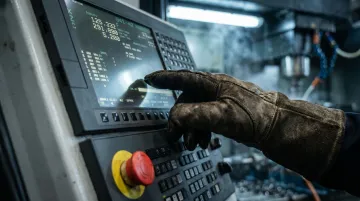
Challenge: A CNC machine shop required reliable operator input despite heavy coolant exposure and mandatory thick leather safety gloves. Previous attempts with standard capacitive panels resulted in missed inputs and operator frustration, contributing to setup delays.
Technology Decision: Deployed 5-wire resistive HMI panels with NEMA 4X enclosures (similar to ValuAdd's CM-eXT2-15W-R-DE with IP66 protection). The mechanical pressure-based sensing works independently of glove material or coolant contamination on the screen surface.
Operational Outcome:
- 100% input reliability regardless of glove type or surface contamination
- Eliminated the workaround of removing gloves to operate the interface
- Reduced input-related downtime and improved overall operator satisfaction
Scenario 2: Water Treatment Control Room (Capacitive Favored)
Challenge: A municipal water treatment facility operated aging resistive HMI panels that showed significant screen wear after years of heavy stylus use. Operators needed to navigate complex SCADA displays with 26,000 process tags but found the stylus requirement and degraded display clarity slowed response times during alarm conditions.
Technology Decision: Upgraded to industrial PCAP panels with high brightness and IP-rated enclosures. The multi-touch capability eliminated stylus dependency while the glass surface provided superior optical clarity and scratch resistance.
Operational Outcome:
- ~10% improvement in operator efficiency navigating complex SCADA screens via multi-touch gestures
- Fewer false inputs compared to worn resistive surfaces
- Eliminated periodic recalibration cycles with drift-free, scratch-resistant glass
ValuAdd's engineering team can evaluate which touch HMI panel fits your facility — including on-site testing with your actual gloves and environmental conditions.
Conclusion
Neither resistive nor capacitive HMI is universally superior — the correct choice is determined by the intersection of operator workflow, environmental conditions, interface complexity, and lifecycle cost expectations. A technology well-matched to its environment will outperform a more capable technology deployed in the wrong conditions.
Use this as a quick reference when narrowing your options:
- Choose resistive for harsh environments with gloved operators, frequent liquid or contaminant exposure, or tight budgets requiring simple single-touch input
- Choose capacitive for clean environments, multi-touch interfaces, or applications where display clarity and responsiveness directly affect throughput
- Prioritize IP rating and surface durability over raw touch technology when environmental exposure is the primary concern
- Factor in total lifecycle cost, not just unit price — recalibration frequency and surface wear affect long-term maintenance burden
Correct panel selection reduces unplanned downtime, cuts maintenance overhead from recalibration and surface wear, and improves operator accuracy on the plant floor. Human error accounts for 23% of unplanned downtime incidents, and industrial facilities face a median cost of $125,000 per hour when production stops. Matching HMI technology to the actual operating environment is one of the more direct levers available for reducing that exposure.
Frequently Asked Questions
What is the difference between capacitive and resistive HMI?
Resistive HMIs detect touch through physical pressure between two conductive layers and work with any input including gloves. Capacitive HMIs detect changes in an electrostatic field and require a conductive object. That distinction drives the choice between them in most industrial applications.
Which is better, capacitive or resistive touch screen?
Neither is universally better. Resistive excels in harsh, contaminated, or glove-use environments while capacitive is better for clean settings requiring multi-touch and high display clarity. The right choice depends on your specific application and operating conditions.
How do I know if my touch screen is capacitive or resistive?
A capacitive screen responds to a light finger touch with no pressure and will not respond to a non-conductive stylus or standard glove. A resistive screen requires noticeable pressure and responds to any object including a gloved finger or stylus.
What is the difference between HMI and touch screen?
A touchscreen is a display input technology. An HMI (Human-Machine Interface) is the broader system encompassing display, software, I/O, and communication protocols that allow operators to monitor and control industrial equipment. Touchscreen panels are one component within an HMI system.
What are the different types of HMI?
The four main categories are:
- Push-button/discrete HMIs
- Text-based display panels
- Graphical touchscreen HMIs (resistive and capacitive variants — the most common modern format)
- PC-based HMI software running on industrial computers
What are the different types of touch screens?
The most common types in industrial HMI are resistive (pressure-based, available in 4-wire, 5-wire, and 8-wire variants) and projected capacitive (PCAP, electrostatic field-based). Surface acoustic wave (SAW) and infrared (IR) exist but see far less use in panel applications.