This article explains what industrial HMI touch screen panels are, why they're critical for modern factory automation, which specifications actually matter, and how to match the right panel to demanding industrial environments.
TLDR:
- Industrial HMI panels eliminate bottlenecks by providing real-time machine control and process visibility
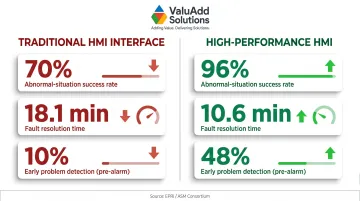
- High-Performance HMI design reduces fault response time by 41% and increases abnormal-situation success rates to 96%
- Match IP/NEMA ratings, touch technology, and protocol support to your specific environment and control architecture
- Look for UL Listed, CE, and FCC certified panels that support EtherNet/IP, Modbus, and PROFINET protocols
- Choose industrial-grade panels over consumer touchscreens to cut TCO by 25-30% over five years
What Is an Industrial HMI Touch Screen Panel?
An industrial HMI (Human-Machine Interface) touch screen panel is a ruggedized operator interface device that allows plant personnel to monitor, control, and interact with machines and automated processes in real time. Unlike consumer-grade touchscreens found in retail or office settings, industrial HMIs are purpose-built to withstand the thermal stress, vibration, dust ingress, and moisture exposure typical of factory floors.
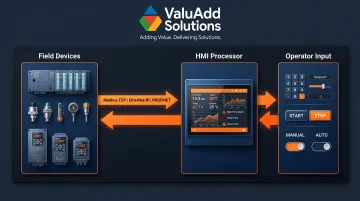
Core Components and Data Flow
Every industrial HMI consists of four essential subsystems:
- Renders process data and captures operator input via resistive (pressure-based) or projected capacitive (electrostatic) display technology
- Processes screen refresh rates, visualization complexity, and local logic execution through onboard processor and memory
- Connects to PLCs, VFDs, sensors, and SCADA servers through serial ports (RS-232/485), Ethernet, and USB interfaces
- Runs the HMI application, manages alarm queues, logs data, and handles protocol translation via an embedded OS (typically Linux or Windows Embedded)
Data flows from field devices (PLCs, sensors, drives) through industrial protocols (Modbus TCP, EtherNet/IP, PROFINET) into the HMI's processor, which renders live values, trends, and alarms on screen. Operator inputs—setpoint changes, start/stop commands, mode selections—travel back through the same path to actuate physical equipment.
Industrial HMI vs. Consumer Touchscreen
Industrial HMI panels carry certifications (UL 61010-2-201, NEMA 4X/12, IP65-IP68) that verify safe operation in environments where unplanned downtime costs up to $2.3 million per hour in automotive plants. That certification gap is the practical dividing line.
Consumer tablets lack sealed enclosures, extended temperature ratings (-20°C to +70°C), and the protocol stacks required to interface directly with Allen-Bradley ControlLogix or Siemens S7 PLCs.
Why HMI Touch Screens Are Critical for Factory Automation
Real-Time Process Visibility
HMI panels consolidate live equipment status, alarm states, production counts, and system health metrics into a single operator interface. This eliminates the need for manual gauge checks or multi-location monitoring, reducing response time when faults occur. Operators can identify which motor tripped, which temperature exceeded setpoint, or which conveyor stalled—all from the HMI screen nearest their station.
Reduction in Human Error
Visual feedback, guided prompts, and alarm management features help standardize procedures and reduce costly mistakes. Research by EPRI and the ASM Consortium demonstrated that implementing High-Performance HMI graphics improved abnormal-situation success rates from 70% to 96%, while cutting fault-resolution time by 41%—from 18.1 minutes to just 10.6 minutes. Operators using HP-HMI screens detected problems before alarms sounded 48% of the time, a fivefold increase over traditional interfaces.
Integration With the Broader Automation Ecosystem
Modern factories are multi-vendor environments. A single production line may include Allen-Bradley PLCs, ABB variable frequency drives, Cognex vision systems, and a Wonderware SCADA server. The HMI acts as the unifying operator touchpoint, pulling data from all these systems via protocol gateways or native drivers.
In multi-machine or multi-zone facilities, that single interface is what turns a collection of isolated equipment into a coordinated, manageable automation architecture.
Safety Improvements
HMI panels enforce safety at the operator level through features that reduce the risk of unsafe actions, including:
- Safety interlock displays and emergency stop confirmations
- Role-based access controls limiting who can adjust critical parameters
- Procedural lockouts (for example, preventing Pump B from starting until Valve 12 is confirmed closed)
- Automatic logging of every override attempt for compliance audits
This is especially critical in high-hazard environments like chemical processing, oil and gas, and heavy manufacturing, where a single procedural error can trigger costly shutdowns or safety incidents.
Productivity and OEE Gains
Faster setpoint adjustments, remote troubleshooting, and continuous data logging all contribute to higher Overall Equipment Effectiveness. Rockwell Automation and Polytron reported that centralizing connectivity and leveraging HMI data visibility enabled a 10–15% increase in OEE for a global beverage producer. For high-volume facilities, that 10–15% OEE improvement represents a measurable shift in output—without adding headcount or equipment.
Key Features to Look For in Industrial HMI Panels
Display Quality and Brightness
High-brightness screens (measured in nits or candelas per square meter) are essential for factory environments with high ambient light or outdoor-facing installations. Standard office monitors output 250-400 nits; sunlight-readable industrial displays require 1,000+ nits to prevent operator errors caused by screen glare. Optical bonding—eliminating the air gap between LCD and cover glass—further reduces reflections and improves contrast in direct sunlight.
IP and NEMA Protection Ratings
Enclosure ratings dictate whether an HMI can survive in your specific environment:
| Rating | Protection Level | Ideal Application |
|---|---|---|
| IP65 | Dust-tight; water jet resistant | General factory floors, machining cells |
| IP66 | Dust-tight; high-pressure washdown | Food processing, pharmaceutical cleanrooms |
| IP68 | Dust-tight; continuous submersion | Wastewater treatment, marine, flood zones |
| NEMA 4X | Corrosion-resistant; outdoor rated | Chemical plants, coastal facilities, salt spray |
| NEMA 12 | Indoor; oil/coolant mist protection | CNC machining, metalworking |
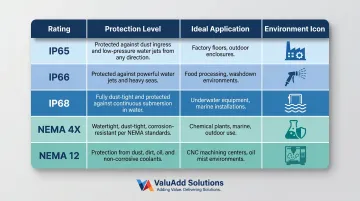
ValuAdd's industrial HMI panels carry IP68, IP66, and IP65 ratings along with NEMA Type 4X and 12 compliance, making them suited for the most demanding facility environments—from washdown-intensive dairy plants to corrosive offshore platforms.
Touch Technology Type
Resistive touch uses a pressure-sensitive flexible layer that works with any object—gloved hands, styluses, or wet fingers. It excels in contaminated environments but is limited to single-touch input and offers lower optical clarity (75-85% light transmission).
Projected capacitive (PCAP) detects electrostatic field changes, enabling multi-touch gestures (pinch, zoom, swipe) and delivering 90-95% optical clarity through tempered glass. Standard PCAP requires bare fingers or specialized conductive gloves and can register false touches from water droplets without hydrophobic coatings and firmware filtering.
For heavy gloves, outdoor exposure, or wet/oily environments, resistive touch is the more reliable choice. PCAP suits multi-touch applications in clean, climate-controlled settings.
Communication Protocols and Connectivity
Industrial HMI panels must connect reliably into both legacy (brownfield) and modern (greenfield) network architectures. Ethernet-based protocols now represent 76% of new factory automation nodes, with EtherNet/IP and PROFINET leading adoption.
Essential protocol support:
- Modbus RTU/TCP – Universal, simple, ideal for brownfield integration and HVAC systems
- EtherNet/IP – Dominant in North America, tightly integrated with Rockwell Automation ecosystems
- PROFINET – Leading Industrial Ethernet standard globally, prevalent in automotive and process automation
- PROFIBUS – Legacy serial fieldbus still active in chemical and water treatment retrofits
- OPC-UA – Platform-independent standard for secure edge-to-cloud data exchange and Industry 4.0 integration
Mismatched protocol support causes some of the most common and costly HMI implementation failures. Confirm native or gateway-supported connectivity before specifying hardware.
Processing Power and Software Capabilities
The onboard CPU, RAM, and operating system determine how fast screens refresh, how many tags the HMI handles simultaneously, and whether the panel runs local ladder logic or only visualizes remote PLC data.
Processing requirements vary significantly by application:
- Simple machine-level displays: ARM Cortex processors with 512 MB RAM typically suffice
- Multi-zone process control: x86 processors with 2-4 GB RAM handle higher tag counts and faster refresh rates
- Multi-screen or multi-line deployments: Scalable software without per-seat licensing fees avoids hidden costs as installations grow
Certifications and Compliance
Verify these certifications before specifying any HMI for U.S. industrial deployment:
- UL Listed (not just UL Recognized Component) – Required for legal installation in U.S. facilities; UL 61010-2-201 governs programmable controllers and HMIs
- CE Marking – Confirms compliance with European EMC and Low Voltage Directives
- FCC Part 15 Class A – Limits electromagnetic emissions in commercial and industrial environments
- Halogen-free construction – Per IEC 61249-2-21, panels rated halogen-free contain ≤900 ppm chlorine, ≤900 ppm bromine, and ≤1,500 ppm total halogens, reducing toxic gas risk during fire events
Types of Industrial HMI Touch Screen Panels
Panel-Mount HMIs
Designed to integrate into control enclosures or machine-mounted operator panels, panel-mount HMIs are the standard for fixed-station manufacturing lines. Key specs to evaluate before ordering:
- Screen size: 4.3 inches (compact machine interfaces) to 21 inches (multi-parameter process displays)
- Cutout dimensions: Verify against manufacturer DXF files before panel fabrication
- Mounting depth: Confirm clearance behind the panel for connectors and cooling
Standalone and Box-Mount HMIs
Freestanding units mounted on pedestals, swing arms, or VESA brackets. Used where operators need mobility along a production line or where retrofitting an existing control panel is impractical. Box-mount HMIs also suit applications requiring IP66/IP68 protection but where panel-mount cutouts would compromise enclosure integrity.
Mobile and Handheld HMIs
Ruggedized tablet-style or handheld devices suited for maintenance technicians and commissioning engineers who move between machines. Tradeoffs compared to fixed HMIs include:
- Smaller screens (typically 7–10 inches) and reduced processing power
- Dependency on wireless connectivity or tethered Ethernet
- Battery life and drop ratings (MIL-STD-810G) as primary selection criteria
How to Choose the Right HMI Touch Screen for Your Facility
Start With Environment Assessment
Before evaluating any product, identify the specific conditions the HMI will face:
- Ambient temperature range (include summer roof deck and winter outdoor extremes)
- Dust and moisture exposure (IP rating requirements)
- Chemical splash or corrosive atmosphere (NEMA 4X, stainless steel enclosure)
- Vibration and shock (MIL-STD-810G or IEC 60068-2-6)
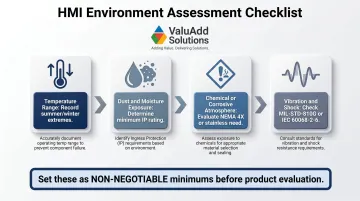
Use this assessment to set minimum IP/NEMA ratings and operating temperature requirements. Mismatched environmental specs are the leading cause of premature HMI failure, so treat these minimums as non-negotiable.
Match Screen Size and Resolution to Operator Tasks
Larger screens (12-21 inches) suit complex multi-parameter process displays where operators monitor dozens of tags simultaneously. Smaller screens (4-7 inches) work for single-machine status readouts or equipment-mounted interfaces.
Resolution must match the operator's working distance and display complexity:
- 12-inch screens: 1280×800 WXGA minimum
- 15-inch and larger: 1920×1080 Full HD minimum
Evaluate Integration Requirements
Audit your existing control architecture:
- What PLC brands and models are installed? (Allen-Bradley, Siemens, Schneider, Mitsubishi)
- Which fieldbus protocols are active? (EtherNet/IP, PROFINET, Modbus TCP)
- Does SCADA software require specific OPC drivers or native tags?
Ensure the HMI panel supports native or easy-to-configure connectivity for your installed base. Protocol gateways add cost, latency, and failure points.
Consider Total Cost of Ownership
A lower-cost panel that requires frequent replacement, lacks software scalability, or demands custom integration work often costs more over a 5-10 year lifecycle. According to this comparison of industrial vs. consumer-grade panel PCs, industrial units achieve 25-30% lower TCO through reduced maintenance, longer component availability, and fewer warranty claims. Factor in:
- Expected service life and MTBF
- Software licensing model (one-time vs. subscription vs. per-seat)
- Spare parts availability and lead time
- Engineering time for integration and commissioning
Work With a Supplier That Offers Engineering Support
Matching HMI panels to specific automation architectures requires technical depth. ValuAdd provides certified HMI solutions (UL, CE, FCC, NEMA 4X/12) alongside engineering expertise to help facilities specify the right panel for their application. That might mean a 7-inch resistive touch panel for a glove-wearing operator in a food plant, or a 15-inch sunlight-readable PCAP screen for an outdoor pump station.
Common Industrial Applications for HMI Touch Screens
Manufacturing and Assembly Lines
HMIs give operators full visibility and control over the production floor without stepping away from their stations. Core functions include:
- Manage conveyor speeds and machine cycle times
- Track production counts and display live throughput targets
- Diagnose faults — jams, e-stops, and tool breaks — with on-screen alerts
- Integrate with barcode scanners and vision systems for real-time quality tracking and traceability
Water and Wastewater Treatment
HMI panels provide real-time monitoring of pump status, flow rates, chemical dosing, and tank levels. They're typically integrated with VFDs for motor speed control and SCADA systems for facility-wide coordination.
Enclosure ratings matter here. Wet process areas demand IP66 or IP68 protection, and chlorine or chemical dosing zones require corrosion-resistant NEMA 4X ratings.
Oil, Gas, and Chemical Processing
These environments impose the most demanding HMI requirements. Panels must operate reliably across extreme temperatures (-40°C to +70°C) and comply with hazardous area classifications. Key specification requirements include:
- Rated for Class I Division 2 or Zone 2 hazardous locations
- Non-incendive or purged/pressurized enclosures depending on zone classification
- FM or ATEX certifications for explosive atmosphere compliance
- Controls for valve management, pressure monitoring, and safety-instrumented functions across complex process trains
Frequently Asked Questions
What is an industrial HMI touch screen?
An industrial HMI touch screen is a ruggedized operator interface panel used to monitor and control machines or automated processes in real time. Unlike consumer-grade touchscreens, it's built to withstand harsh factory conditions—dust, moisture, temperature extremes, vibration—and interfaces directly with industrial control systems like PLCs and SCADA.
What is the difference between an HMI and a touch screen?
While all HMI panels may use a touch screen as their input method, not all touch screens are HMIs. An HMI includes the software, communication interfaces (Modbus, EtherNet/IP, PROFINET), and industrial-grade hardware needed to connect with and control industrial equipment. Consumer tablets offer none of these capabilities.
What IP rating should an industrial HMI panel have?
The required IP rating depends on your environment. IP65 protects against dust and water jets (general factory floors); IP66 handles high-pressure washdown (food processing); IP68 suits submersion scenarios (wastewater, marine). Facilities in food processing, outdoor installations, or water treatment typically require IP66 or higher.
What communication protocols do industrial HMI panels support?
Most industrial HMI panels support Modbus RTU/TCP, EtherNet/IP, PROFIBUS, PROFINET, and OPC-UA. This broad protocol support is essential for integrating with diverse PLCs (Allen-Bradley, Siemens, Schneider), VFDs, and SCADA systems. Mismatched protocols are a leading cause of costly project delays, so verify compatibility before purchasing.
What is the difference between an HMI and SCADA?
An HMI is a local operator interface for a specific machine or process area, displaying real-time data and accepting operator commands at the point of control. SCADA (Supervisory Control and Data Acquisition) is a broader system that aggregates data from multiple HMIs and field devices across an entire facility or multiple sites, with HMIs serving as the frontline interfaces that feed into it.