Introduction
Pick the wrong HMI screen size and you'll feel it fast. An undersized panel forces operators to navigate multiple sub-screens during alarms—adding critical seconds to response times. An oversized panel in a cramped cabinet drives up enclosure modification costs and can push commissioning back by days.
This guide helps plant engineers and system integrators match screen size to application. It covers what each size is built for, how dimensions map to real industrial use cases, and which factors—viewing distance, data density, cabinet space, environmental rating—drive outcomes like reduced operator error and faster alarm response.
Key Takeaways
- Screen sizes range from 4" (simple status monitoring) to 15" (complex multi-parameter SCADA dashboards); mismatches waste budget or limit operator effectiveness
- 4"–7" screens fit compact, single-process machines; 8"–10" works for most standard panels; 12"–15" handles high-data-density, multi-zone operations
- Key selection factors: application complexity, viewing distance, cabinet space, and scalability requirements
- IP rating (IP65–IP68) and display brightness determine which screen sizes hold up in harsh, outdoor, or washdown environments
- Match screen size to current AND future data visualization needs—migrating from larger to smaller screens is harder than scaling up
What Is an HMI Screen and Why Does Size Matter?
An HMI (Human Machine Interface) screen is the visual and interactive interface between an operator and an industrial machine or process. Typically a touchscreen panel, it displays real-time data, alarms, setpoints, and controls from PLCs or SCADA systems. HMIs are deployed across manufacturing, oil and gas, water treatment, food and beverage, and processing plants.
Screen size is a functional engineering decision with direct operational impact. It directly affects:
- How much data appears simultaneously on a single screen
- Touch accuracy for gloved operators in field environments
- Panel cutout dimensions and enclosure compatibility
- Total system cost
Choosing the wrong size for your application's complexity increases operator errors, adds unnecessary navigation steps, and slows alarm response.
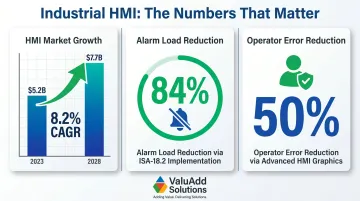
That operational impact is driving significant investment: the industrial HMI market is projected to grow from USD 5.2 billion in 2023 to USD 7.7 billion by 2028 (8.2% CAGR), fueled by demand for deeper machine-level visibility. Proper HMI design and alarm rationalization yield measurable results: implementing ISA-18.2 standards reduced alarm loads by 84% at one chemical plant, while advanced operator graphics cut operator errors by 50%.
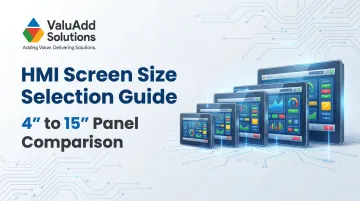
HMI Screen Size Breakdown: 4" to 15" Panel Comparison
This section covers typical resolutions, display areas, mounting cutout requirements, and application scenarios for the most commonly deployed HMI range in industrial automation.
Small Format HMI Panels (4" to 7")
Typical Specifications:
- 4" panels: 480×272 resolution, cutouts ~119×99 mm
- 7" panels: 800×480 (WVGA) resolution, cutouts ~179×142 mm
Ideal Applications: Small format panels excel where parameter count is limited—start/stop controls, single-variable monitoring, dosing units, compact packaging machines, or field-level status displays. Operators typically work within 30–50 cm of the screen.
Trade-offs: A standard 7" panel lists around $705, making cost the primary advantage over larger formats. The limitations are real, though:
- Limited RAM restricts the number of simultaneous graphical elements
- Content designed for larger screens cannot simply be scaled down—each screen requires complete redesign
- Unsuitable for multi-zone process views or alarm history dashboards
ValuAdd's CM-eXT04-D (4.3") and CM-eXT2-07-R-DF (7") models offer IP65 and IP68 protection respectively, with the 7" model featuring 1024×600 resolution and dual Ethernet connectivity for more complex applications.
Mid-Range HMI Panels (8" to 10")
Typical Specifications:
- 8"–10" panels: 800×600 to 1024×600 resolution
- Display areas accommodate 6–12 simultaneous process parameters
- Mounting cutouts fit standard mid-size control cabinets
Ideal Applications: This is the most commonly deployed size for general manufacturing—conveyor lines, pump stations, motor control centers, and batch systems. Operators typically stand 50 cm to 1 meter from the panel.
Real Estate vs. Footprint Balance: Mid-range panels provide enough real estate for trend charts, alarm banners, and navigation buttons without the cost or footprint of large-format panels. Touchscreen usability with gloved hands is reliable at this size with minimum button targets of 10 mm.
ValuAdd's CM-eXT2-10W-R-DE offers 1280×800 resolution with 500 nits brightness, while the CM-eXT2-10W-RH-DF high-brightness model delivers 1,200 nits with IP68 protection for outdoor or high-ambient-light installations.
Large Format HMI Panels (12" to 15")
Typical Specifications:
- 12" panels: 1280×800 (WXGA) resolution, 16:10 aspect ratio
- 15" panels: 1024×768 or 1920×1080 resolution, 4:3 or widescreen aspect ratios
- Wide display areas support full process flow diagrams, multi-channel trend graphs, recipe management, and SCADA-style dashboards
Ideal Applications: Large format panels are the standard choice when operators need to manage multiple process zones from a single screen or monitor from 1–2 meters away:
- Central operator stations in manufacturing cells
- Water treatment control rooms
- Oil and gas processing skids
- Multi-zone batch or continuous process monitoring
One underappreciated advantage: the 15" panel's traditional 4:3 aspect ratio (1024×768) aligns with many older SCADA and MES software layouts, preserving absolute pixel positions and avoiding content distortion during migrations.
Budget accordingly. Larger cutouts demand more cabinet space, and higher-resolution panels require more CPU and RAM. A high-performance 15" panel can cost $8,636—a 12× premium over entry-level 7" units.
ValuAdd's CM-eXT2-15W-R-DE (1920×1080 Full HD, 450 nits) and CM-eXT2-15W-RH-DF (1200 nits, IP68 protection) models serve demanding applications requiring maximum visibility and environmental resilience.
Key Factors When Selecting Your HMI Screen Size
Screen size selection must connect technical specifications to operational requirements. The following factors help engineers move beyond "bigger is better" to decisions grounded in application complexity, environment, and total cost of ownership.
Application Complexity and Information Density
The number of process variables, alarms, and graphical elements that must be visible simultaneously is the primary driver of screen size selection.
Practical Rule of Thumb:
- 1–4 simultaneous parameters: 4"–7" panels
- 5–10 parameters: 8"–10" panels
- 10+ parameters (including trend charts, recipe tables, multi-zone diagrams): 12"–15" panels
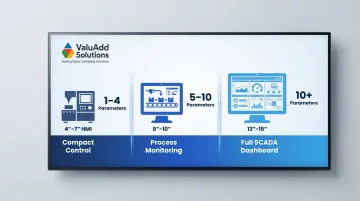
Designing for a smaller screen than the application requires forces multi-screen navigation during time-sensitive events, increasing the risk of operator error.
Operator Viewing Distance and Ergonomics
Distance between operator and panel directly determines minimum legible screen size:
- Up to 50 cm: 4"–7" panels
- 50 cm–1 m: 8"–10" panels
- 1–2 m: 12"–15" panels
Touch target sizing is equally critical. Industry standards recommend minimum touch targets of 20–25 mm for thin gloves and 25–40 mm for thick work gloves, with ISA-101 and IEC 61131 recommending 15 mm minimum for standard controls. On smaller screens, meeting these dimensions limits how many controls fit on a single screen.
Panel and Cabinet Space Constraints
Physical mounting cutout requirements must be evaluated against available cabinet or machine panel space before specifying a screen size. Small format (4"–7") panels suit compact and embedded machine enclosures. Large format (12"–15") panels require deeper, wider cabinet designs — ignoring this constraint leads to costly enclosure modifications or forced downgrades at installation.
Environmental Protection and Display Brightness
Harsh industrial environments — washdown areas, outdoor installations, food processing, oil and gas — require HMI panels rated to IP65, IP66, or IP68 standards. Not all screen sizes are available in ruggedized configurations.
IP Ratings Explained:
- IP65: Dust tight, protected against water jets
- IP66: Dust tight, protected against powerful water jets
- IP68: Dust tight, protected against continuous immersion
One spec to scrutinize carefully: many industrial HMIs publish IP ratings for the front panel only. That front panel rating is only guaranteed when the unit is properly mounted in a certified enclosure with correct gasket sealing.
Brightness requirements vary just as much as ingress protection — match the nit rating to the ambient light conditions of the installation site.
Display Brightness Requirements:
- Standard indoor applications: 300–450 nits
- High-brightness/outdoor applications: 1,000–1,800 nits
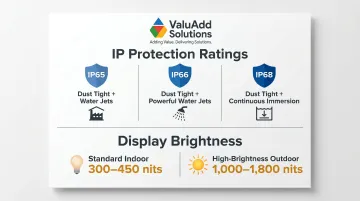
ValuAdd's CM-eXT2-10W-RH-DF and CM-eXT2-15W-RH-DF models deliver 1,200 nits brightness with IP68 protection, covering both outdoor readability and NEMA Type 4X compliance requirements in a single unit.
Budget vs. Long-Term Scalability
Smaller panels cost less upfront, but under-specifying for a growing process creates expensive retrofit scenarios — screen replacement, re-engineering of HMI programs, and potential panel modifications.
Recommendation: Factor in projected process complexity growth over a 3–5 year horizon. When future expansion is likely but not yet fully defined, mid-range panels (8"–10") offer the most flexibility without committing to the full cost of a large-format installation. The five factors above — complexity, ergonomics, space, environment, and budget — work together; optimizing for one without considering the others is where most specification errors originate.
How ValuAdd Can Help
Selecting the right HMI panel size is only half the decision — finding a supplier who understands your application is the other. ValuAdd provides technical expertise and a comprehensive product portfolio to help engineers specify and source HMI panels that fit both operational requirements and compliance standards.
ValuAdd's team brings hands-on experience across manufacturing, oil and gas, water treatment, and processing industries, helping customers match HMI screen size and specifications to actual operational outcomes. For system integrators, ValuAdd offers custom engineering support for panels requiring specific certifications (UL, CE, FCC, IP68, NEMA Type 4X and 12).
Key Advantages:
- High-brightness industrial displays with IP68 protection (1,200 nits)
- Fully integrated programmable control systems
- Territory-based technical support
- Fast shipping and delivery options
- Compliance-ready products: UL Listed, CE Certified, IEEE 519-compliant
ValuAdd's HMI panel lineup spans 4.3" to 15.6", covering the full range of screen sizes discussed in this guide:
- CM-eXT04-D — 4.3", IP65, compact operator interface
- CM-eXT2-07-R-DF — 7", IP68, suited for washdown and wet environments
- CM-eXT2-10W-RH-DF — 10.1", high-brightness display for high-ambient-light settings
- CM-eXT2-12W-R-DF — 12.1", dual Ethernet for networked process control
- CM-eXT2-15W-RH-DF — 15.6", Full HD, IP68 for complex supervisory applications
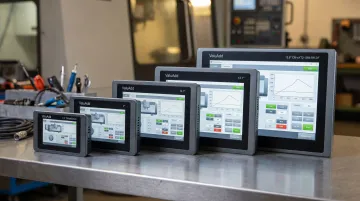
All models include Ethernet, serial, and USB connectivity with an embedded Linux OS for dependable industrial operation.
Conclusion
Choosing the right HMI screen size comes down to four factors: application complexity, operator ergonomics, environmental conditions, and available cabinet space. The panel that fits those requirements — not the largest or most popular option — is the one that lets operators monitor, control, and respond without unnecessary navigation steps.
As processes evolve, data requirements grow, and facilities modernize, HMI screen size decisions should be revisited. A panel that served a single-loop application can become a bottleneck as more variables are added. Reviewing screen size alongside any significant process expansion keeps your HMI aligned with what operators actually need on the floor.
Frequently Asked Questions
How to calculate LCD screen size?
LCD screen size is measured diagonally from corner to corner of the active display area in inches. The physical panel cutout dimensions are larger than the screen diagonal measurement—always check the mounting cutout specification, not just the diagonal, when planning cabinet installations.
How to choose an HMI?
Key selection criteria:
- Display size and resolution relative to process complexity
- Communication interfaces (Ethernet, Profinet, serial)
- IP/NEMA protection rating for the installation environment
- Compatibility with existing PLC or SCADA software
- CPU/RAM performance for the required number of graphical elements
What are standard screen sizes?
Standard industrial HMI screen sizes typically range from 4" to 21", with the most common deployments at 7", 10", 12", and 15" diagonal. Small format (4"–7") works for compact machine-mounted applications; mid-range (10"–12") covers general manufacturing; 15"+ panels are best suited to central operator stations and SCADA-linked control rooms.
How to design an HMI screen?
Core design principles:
- Organize screens by process hierarchy (overview → area → asset)
- Size touch targets to a minimum of 10 mm for gloved-hand operation
- Limit simultaneous display elements to avoid cognitive overload
- Use color consistently for status indication
- Keep navigation accessible from every screen
What is the resolution of 7 inch HMI?
Most 7" industrial HMI panels use 800×480 pixels (WVGA) resolution, with higher-end models offering 1024×600. Resolution affects how many parameters and graphical objects can be clearly displayed simultaneously. 800×480 is sufficient for 4–6 process variables with basic trend and alarm functionality.